If you have ever adjusted the bass or treble on a car stereo, you have already used a form of EQ. That same idea exists in software form, and it is called a VST plugin.
VST plugins let you apply audio effects to your microphone or other audio sources in real time, all running on your computer. This guide covers what they are, where the format came from, how they work, where the files live on your system, and where to find effects to try.

Why VST exists
Before software plugins, getting professional audio effects meant owning physical hardware. A compressor was a rack unit. An EQ was a dedicated piece of gear. Reverb came from a physical effects processor. Putting together a proper studio meant spending thousands of dollars on equipment before you could record a single thing.
VST was created by Steinberg in 1996 to change that. The idea was to define a standard format that any developer could build to, and any compatible host application could load. Instead of buying a hardware rack unit, you could install a VST plugin and get the same functionality on your computer. That opened the door to an entire ecosystem of third-party plugins, from large audio companies to independent developers, all building tools that work across any compatible software.
That is where the name comes from. Virtual Studio Technology - a virtual version of the physical studio.
Two types of VST: effects and instruments
Not all VST plugins do the same thing. There are two main types.
VST effects (VST-FX) process audio that passes through them. These are the plugins most relevant to microphones and streaming setups. An equalizer shapes the tone of your voice. A compressor evens out your levels. A noise remover cleans up background sound. A reverb adds space and depth. These effects work on audio that already exists and modify it in real time as it passes through the plugin.
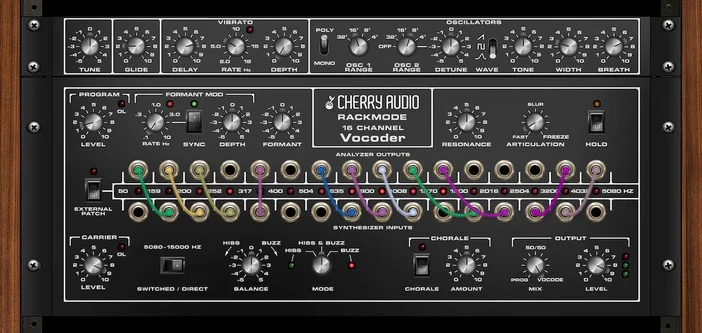
VST instruments (VSTi) generate audio from scratch, typically from MIDI input. A software synthesizer, a virtual piano, or a drum machine are all examples of VSTi plugins. They are primarily used in music production inside a DAW (Digital Audio Workstation) rather than for microphone or streaming setups.
For most people using VST plugins with a microphone, VST effects are what you are looking for.
VST2 vs VST3
VST stands for Virtual Studio Technology, a plugin format developed by Steinberg. VST2 was the dominant format for many years and is still found across older plugin libraries. VST3 is the current standard and brings meaningful improvements: better performance, lower CPU usage, support for side-chaining, and more precise parameter control. Most modern plugins are released as VST3.
On macOS, the equivalent format is AU (Audio Units), Apple's native plugin standard. VST and AU serve the same purpose but are not interchangeable. If you are on macOS, look for AU versions of any plugin you want to use.
VSTs need a host to run
A VST plugin cannot run on its own. It needs to be loaded inside a application that supports the format. The host handles audio routing, loads the plugin into your signal chain, and passes audio through it in real time.
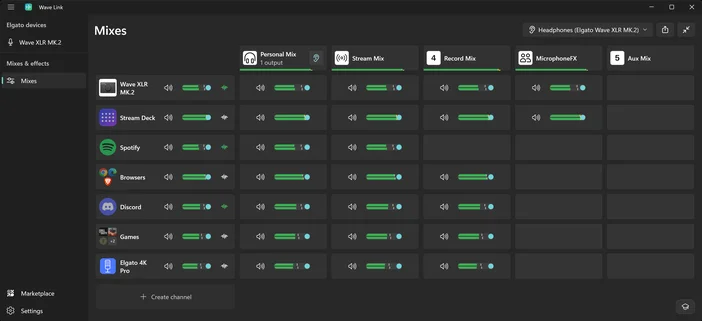
Common hosts include audio mixing software like Wave Link, recording applications, and streaming tools like OBS Studio. When you install a VST plugin, it becomes available to any compatible host on your system automatically.
Where VST files are stored
When you install a VST3 plugin on Windows, it is placed in a standard folder that host applications scan automatically:
C:\Program Files\Common Files\VST3
Most plugin installers use this location by default. If a plugin is not showing up in your host software after installation, it is worth checking that the file ended up here. Some installers offer a custom path during setup, which can cause plugins to go missing if the host is only scanning the default location.
On macOS, AU plugins are installed to:
/Library/Audio/Plug-Ins/Components
This is the system-level location that AU-compatible hosts scan when loading plugins.
Finding your VST folder from Wave Link
If you are using Wave Link on Windows, you can navigate directly to your VST3 folder from within the app without opening File Explorer manually. When adding an effect to a channel, Wave Link includes a shortcut to open the VST3 plugin folder directly, making it easy to check what is installed or drop in a new plugin file.
Find VST effects on Elgato Marketplace
Elgato Marketplace includes a curated library of audio effects you can browse and install directly into Wave Link. These range from practical utility plugins like noise removal, EQ, and compression, to creative effects like voice changers and reverb. Many are free.
Once installed, the plugins sit in your VST3 folder and are available to any compatible software on your computer. Wave Link, OBS Studio, DAWs, and any other VST3-compatible software will pick them up from the same location automatically.

From the Wave Link section of Marketplace, you will find effects across categories including:
- Noise suppression and voice clarity tools
- EQ and compression for shaping your voice
- Voice changers and character effects, including options from Voicemod
- Reverb and environment effects
Plugins from Marketplace install in a few clicks and appear in Wave Link automatically. If you want to use a plugin in other software, you can also download it manually from your account profile and place the file in your VST3 folder.
PRODUCTS IN ARTICLE