An compressor is one of the most common tools in audio, used in everything from podcasts and live streams to broadcast and music production. If you are new to the concept, this guide covers what a compressor does, how each control works, and where to find one for your setup.
What is a Compressor
When you speak, your voice naturally varies in volume. You get louder when making a point, quieter when thinking, and louder again when you laugh or react. That variation feels natural in a room, but on a recording or stream it can be distracting. Quiet moments get lost, loud moments become overwhelming, and the overall listening experience suffers.
A Compressor is an effect that levels out your voice. When you you get loud, it pushes down the peaks to keep your voice from getting too loud. When things settle, it backs off. By flattening loud movements in specific ways and bringing up quiet moments, a compressor can make your voice more comfortable and easier to listen to
Done right, compression is invisible. The listener never knows it is there.
Understanding the controls
Knowing what a compressor does is one thing. Knowing how to shape it for your voice is where it gets useful. The good news is that the controls are largely the same across most compressors, so once you understand them, they will feel familiar wherever you encounter them.
Threshold
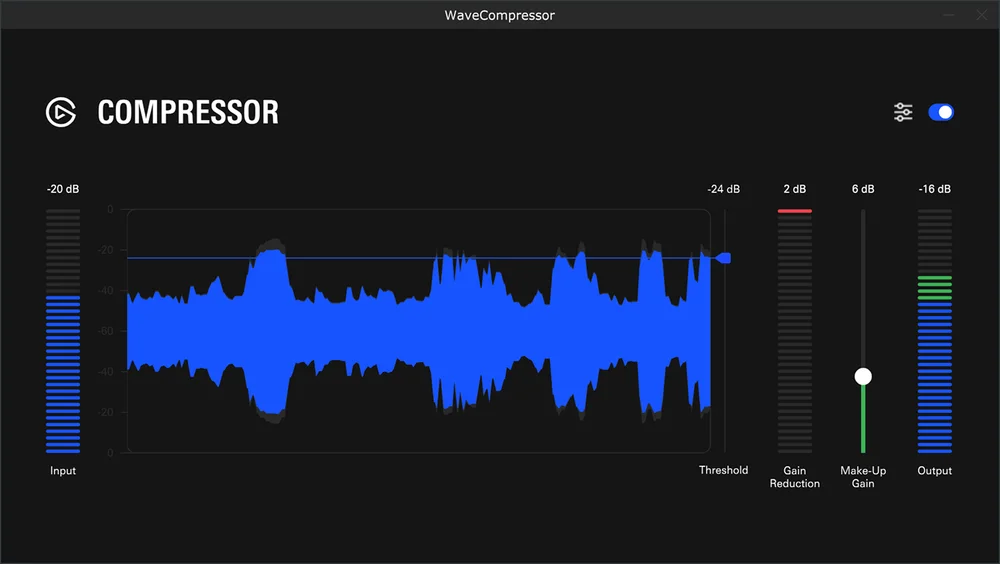
Think of this as the point at which the compressor steps in. Set it lower, and the compressor gets involved more often, keeping your voice consistently even throughout a conversation. Set it higher, and it only catches the biggest spikes, like when you suddenly raise your voice or lean into the mic. Start in the middle and adjust based on how much your volume naturally varies when you speak.
Gain Reduction
This meter just shows when the compressor is actively working. When it moves, the compressor is smoothing something out. When it stays still, your voice is sitting at a consistent enough level that nothing needs adjusting. It is a useful visual check to confirm the compressor is doing its job.
Make-Up Gain
Compression works by pulling louder moments down. As a side effect, your overall voice can feel slightly quieter than before. Make-Up Gain lets you push that volume back up, so your voice stays clear and present in the mix after everything has been evened out. Compression with makeup gain can actually make your voice feel louder without worrying about peaking in the signal. If you're already getting near the red zone on your audio meters but feel quiet, compression might be the secret you need.
Output
This meter shows the final level of your signal after the compressor and Make-Up Gain have done their work. It is the end result: what actually leaves the compressor and heads into your apps. A healthy output level means your voice is balanced, consistent, and ready to go. If the output looks much lower or higher than you expect, use Make-Up Gain to bring it to where you want it.
Advanced settings
Ratio
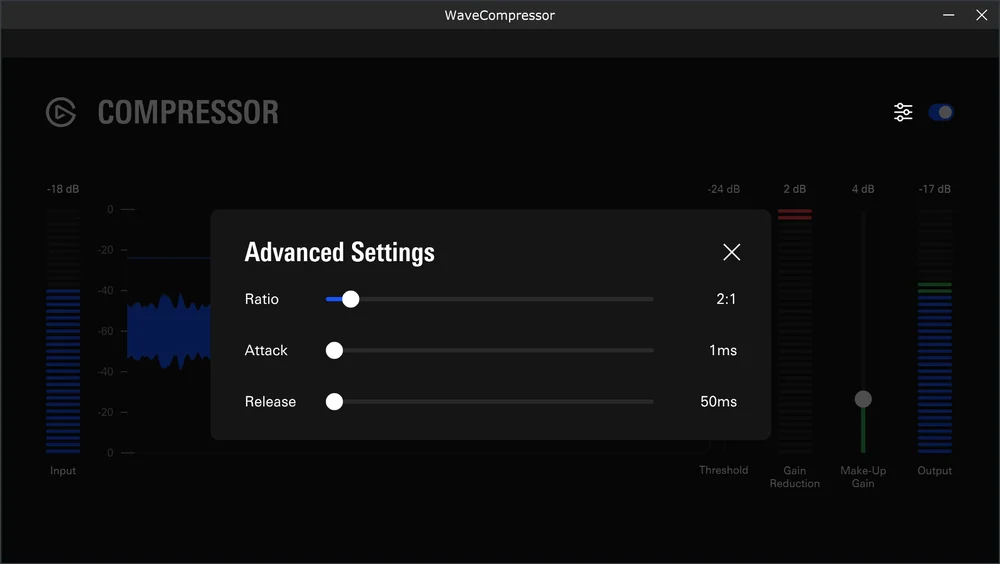
This controls how hard the compressor clamps down once it kicks in. A low ratio makes small, gentle adjustments. A higher ratio means it takes stronger action on loud moments. For most voices, 2:1 is a good starting point. It keeps things natural and consistent without the compression becoming noticeable.
Attack
This is how fast the compressor reacts when your voice gets loud. A faster attack means it responds almost instantly. A slower attack lets a tiny burst of volume through before it kicks in, which can make your voice feel more natural and less squeezed. 1ms is a solid starting point.
Release
Once the compressor has done its job, this controls how quickly it backs off and returns to normal. Too fast, and you might hear it pumping in and out. Too slow, and it can linger longer than needed. 50ms works well for most voices, giving the compressor enough time to recover naturally between words without hanging on too long.
Get a free Compressor for any microphone
If you want to try a compressor on your setup, Elgato offers a free Compressor effect on Elgato Marketplace. It works with any microphone or audio interface and installs directly to Wave Link in a few clicks. Wave Link is free to download on Windows and macOS and works with any microphone, so no specific hardware is required to get started.
Browse audio effects on Elgato Marketplace and download Wave Link for free to get started.
Using a Wave Next device?
If you are using Wave:3 MK.2, Wave XLR MK.2, XLR Dock MK.2, and Wave XLR Pro, a Compressor is already built into your hardware as part of the onboard DSP effects suite. No download needed. You can enable and adjust it directly through Wave Link.

To understand how the full signal chain works, check out our guide on what Wave FX is and how it works.
Wrapping up
A compressor is one of the most reliable tools for maintaining a consistent voice. It handles the variation in how you speak, so quiet moments stay audible, loud moments stay controlled, and your voice comes through clearly from start to finish. Once it is set up, it works in the background without you having to think about it. For calls, recordings, streams, or anything where your voice needs to hold up over time, it is worth having in your setup.
PRODUCTS IN ARTICLE