Not every session needs a PC involved. Standalone Mode lets Wave XLR Pro run your mix, process your mic, and output audio entirely on its own.
Keep your mix running without a PC
Most audio mixers go silent the moment your computer is off or disconnected. Wave XLR Pro is different. With Standalone Mode, the mixer continues running independently — your DSP effects stay active, your routing stays intact, and your audio keeps flowing exactly as you configured it.
Sometimes you just want to jump into a game or unwind without booting up your PC. And if you're running a dual-PC setup, there are plenty of sessions where the streaming PC simply doesn't need to be on. Standalone Mode means Wave XLR Pro keeps working either way — your microphone is processed, your mix is running, and audio is flowing through your headphones without touching either machine.
How it works
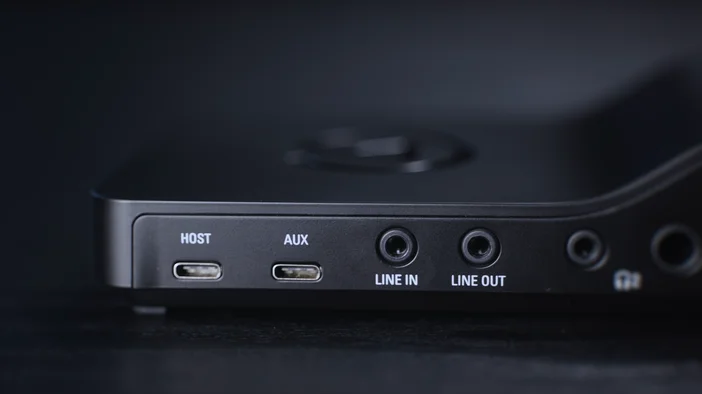
Wave XLR Pro has two USB-C ports. USB Host is your primary connection to a computer — this is where Wave Link connects and where you configure your mixes, routing, and DSP effects. USB Aux is for secondary sources like consoles, phones, or a second PC, with simple plug-and-play connectivity and no drivers required.
Either port can power Wave XLR Pro into Standalone Mode. Connect a power supply or power bank to USB Host, or power via USB Aux from a console or charger — the result is the same. Wave XLR Pro boots up, your Standalone Mode profile loads automatically, and the device runs independently. Your microphone is processed, your effects are active, and your mix outputs as normal.
What stays active in Standalone Mode
When running standalone, Wave XLR Pro retains your saved configuration from the last time it was connected to Wave Link. This includes DSP effects like compression, EQ, and Voice Tune. Your mix routing and output assignments are preserved as well.
VST plugins, which run on your computer rather than on the device itself, are not available in Standalone Mode. Those require an active connection to your host machine.
A note on Wave Link
Wave Link is required to configure Wave XLR Pro's mixing engine — Wave FX Processor handles Clipguard 2.0, DSP effects, and VST inserts, and Wave Link is how you control all of it. But once everything is configured, Wave Link doesn't need to be running. The routing and processing live on the device itself, so everything carries over into Standalone Mode automatically.
One exception: VST insert won't be active in Standalone Mode. It relies on your computer to run, so without Wave Link open, VSTs drop out of the chain. Clipguard 2.0 and your DSP effects stay active.
PRODUCTS IN ARTICLE