TC Helicon's GoXLR has been discontinued, and with it, ongoing software updates and support. If you're a GoXLR user weighing your options, or researching streaming audio mixers for the first time, here's a comparison of where things stand and what Wave XLR Pro brings to the table.
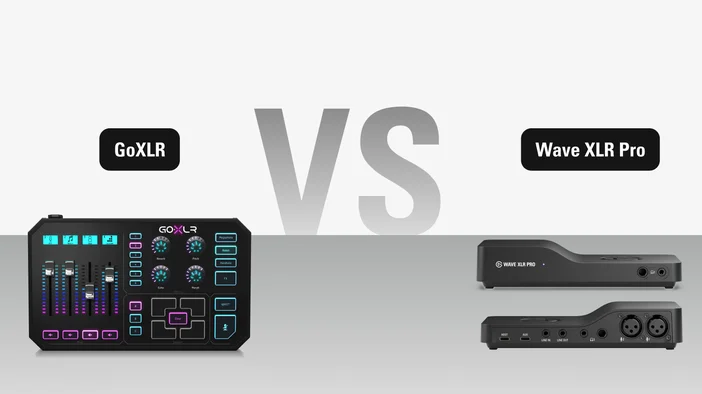
At a glance
| Feature | GoXLR | Wave XLR Pro |
| macOS | No | Yes |
| XLR inputs | 1 | 2 |
| Max mic gain | ~72 dB | 80 dB |
| Independent hardware mixes | 4 channels | 5 full mixes |
| Dual USB-C (2nd PC/console) | No | Yes |
| VST Insert | No | Yes |
| Zero-latency DSP monitoring | Yes | Yes |
| Standalone operation | No | Yes |
| Stream Deck integration | Plugin | Native |
| Internal processing | 24-bit / 48 kHz | 32-bit float / 48 kHz |
| ADC resolution | 24-bit / 48 kHz | 24-bit / 48 kHz |
| Dynamic range | >110 dB | 135 dB |
| Connector | USB-B to A (Printer Cable) | USB-C |
| Power | DC-Power | USB-C (Host or Aux) |
Where the GoXLR falls short
GoXLR earned its reputation. It brought physical faders, onboard DSP, and a dedicated streaming mixer to the mainstream. But with support ended, its limitations are harder to work around.
- No more updates. TC Helicon no longer manufactures or supports the GoXLR. No bug fixes, no new features, and an uncertain supply of replacement units.
- Windows only. macOS users have no way to use it, which rules it out for a growing number of setups.
- One XLR input. Running a co-hosted podcast or two-mic setup requires external workarounds.
- No dual USB for a second PC or console. The analog LINE IN/OUT workaround for dual-PC setups works, but adds complexity.
- No third-party plugin support. The effects that ship with the device are all you get. There's no way to expand your processing chain with VST or AU plugins.
These are real workflow constraints, and they add up over time.
What Wave XLR Pro does differently
Run two mics from one device
If you co-host a podcast, have guests on stream, or just want a second mic ready to go, Wave XLR Pro removes the need for a separate interface or preamp. It has two independent, studio-grade XLR preamps, each delivering up to 80 dB of clean gain with 48V phantom power. Even demanding dynamic microphones like the SM7B perform cleanly without a Cloudlifter or similar booster.
Connect a second PC or console without workarounds
Dual-PC streaming is one of the most common reasons GoXLR users look for alternatives. Wave XLR Pro includes a dedicated USB-C AUX port for connecting a second PC, console, or phone directly. No analog cables daisy-chained between machines. Both USB ports run simultaneously, and USB AUX can even power the unit in Standalone Mode when your main PC is off. For a step-by-step walkthrough, check out our guide to running a dual-PC setup with Wave XLR Pro.
Send different audio to different destinations
Instead of a single mix going everywhere, Wave XLR Pro lets you create five completely independent mixes across 12 channels, all processed by the device's Wave FX Processor. You can send one mix to your headphones, another to your stream, another to a recording, and another to voice chat. Each mix is tailored to exactly what that destination needs to hear, and all five run simultaneously in hardware with zero latency.
Shape your voice with onboard DSP effects
GoXLR has built-in effects, but no way to expand them. Wave XLR Pro runs seven onboard DSP effects on its dedicated Wave FX Processor, giving you broadcast-quality sound processed directly at the source with zero perceptible latency. The effects include:
- Low-Cut Filter removes rumble from desk vibrations and handling noise
- Expander reduces background noise transparently while leaving your voice untouched
- Voice Tune blends compression and harmonics for warm, broadcast-style sound with a single control
- Compressor keeps soft and loud moments balanced and controlled
- Equalizer with four bands for sculpting warmth, reducing muddiness, or improving clarity
- Ducking on every channel, automatically lowering background audio when you speak
- Mix Maximizer on each of the five mixes, boosting loudness while preventing clipping
All seven effects can run simultaneously on the hardware. Enable the ones you need, and what you hear in your headphones is exactly what your audience receives.
Auto Gain Wizard is also built in as a setup tool. Speak at your normal volume for about five seconds, and it automatically sets your optimal gain.
Expand your sound with VST and AU plugins
If you've ever wanted to add reverb, a de-esser, or a voice effect to your stream, Wave XLR Pro opens that door. Third-party VST and AU plugins are inserted directly into the hardware input signal chain through Wave Link, with a dedicated low-latency insert path that keeps added delay to a minimum. Your plugins work across every app you use without virtual microphones or complex routing workarounds.
Browse Elgato Marketplace for audio effects like noise suppressors to voice changers.
Never worry about clipping
GoXLR has no anti-clipping technology. Wave XLR Pro uses Clipguard 2.0, an intelligent anti-distortion system that makes clipping virtually impossible. It works in three stages: stacked ADC converters capture your signal across multiple ranges to stop overload at the source, 32-bit float internal processing provides massive headroom so volume spikes never hit a digital ceiling, and digital limiters smooth out sudden peaks before they reach your system.
Hear exactly what your audience hears
Monitoring delay is one of the most common frustrations with audio setups. Wave XLR Pro processes all DSP effects on its Wave FX Processor chip, so you hear your fully processed voice through the headphone outputs with zero-latency monitoring. Every channel within each mix has its own FX Select option in Wave Link, so your personal monitoring mix can run zero-latency DSP while your stream mix includes VST effects on top. Two high-power headphone outputs (front and rear, both with 3.5 mm and 6.3 mm jacks) support up to 600-ohm headphones, so a host and co-host can each monitor separate mixes.
Keep your audio running without a PC
Shut down your PC after a stream session, but still want to keep playing on your console with your headphones and mic? Wave XLR Pro can run completely standalone as long as it receives power through USB AUX. Your saved mix, routing, and DSP effects stay active without a host computer.
Connect your existing analog gear
Wave XLR Pro includes stereo line input and line output on 3.5 mm jacks. Route audio from external recorders, mixers, cameras, or interfaces, and send your polished mix to powered monitors, external recording devices, or additional gear. This gives you the same analog flexibility as the GoXLR, plus everything else on top.
Use it on Windows or macOS
GoXLR never supported macOS. Wave XLR Pro is fully compatible with Windows 11 (or newer) and macOS 14.2 (or newer), so your setup works regardless of your platform.
One app for all your audio
Wave XLR Pro runs its mixes, effects, and routing directly on the hardware, but you need Wave Link 3.0 to set everything up. Wave Link is free audio routing and mixing software built for creators. It's where you configure your five mixes, apply and adjust DSP effects, set up VST/AU plugins, and manage your entire signal flow. It works with any microphone or interface your computer sees, not just Elgato hardware. Once your setup is dialed in, Wave XLR Pro stores your settings and runs independently, even in Standalone Mode without a computer. To explore everything Wave Link can do, check out our Wave Link overview.
Even better with Stream Deck
Wave XLR Pro works great on its own, but adding a Stream Deck takes the experience further. One of the biggest things GoXLR users love is having physical controls right at their desk. Stream Deck brings that same hands-on feel with even more flexibility. With Stream Deck + or Stream Deck + XL, you get customizable dials for controlling your stream, adjusting volume, toggling effects, and visual feedback showing your levels at a glance.
Making the switch
If you're coming from a GoXLR, the transition is straightforward. Wave XLR Pro connects to your computer with a single USB-C cable and handles everything from there. Start with one mic and one mix. The complexity stays hidden until you need it. As your setup grows, whether that's adding a co-host, moving to a dual-PC rig, or integrating third-party plugins, the infrastructure is already there.
Wave XLR Pro ships Q2 2026. Pair it with Wave Link 3.0 and Stream Deck for the full experience.
PRODUCTS IN ARTICLE