No more constantly checking your watch or phone clock. Instead, tell time with a quick glance at Stream Deck. With the Clocks plugin, keep track of different time zones at a glance, whether you have an important meeting with your remote coworkers from different continents, or when you're talking to your guild members from around the world.
Turn any key into a digital timepiece. Personalize your display style, then switch time zones with a press or dial turn.
See It in Action
Check out our short-form video or scroll down to learn more about the features and actions available.
Key Features
Here's what you can do with Clocks plugin once it's set up on your Stream Deck.
Stay Synchronized Across Time Zones
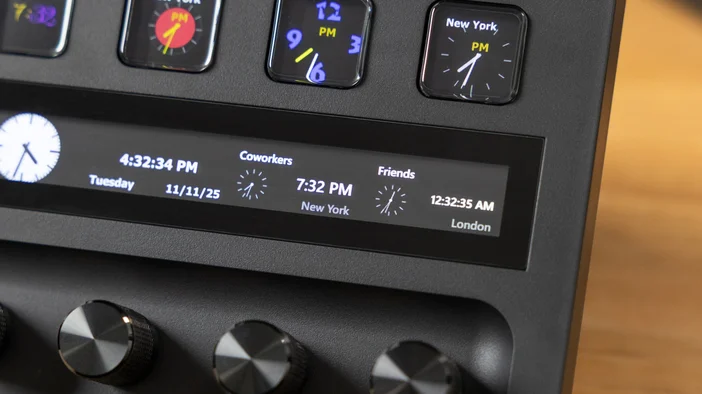
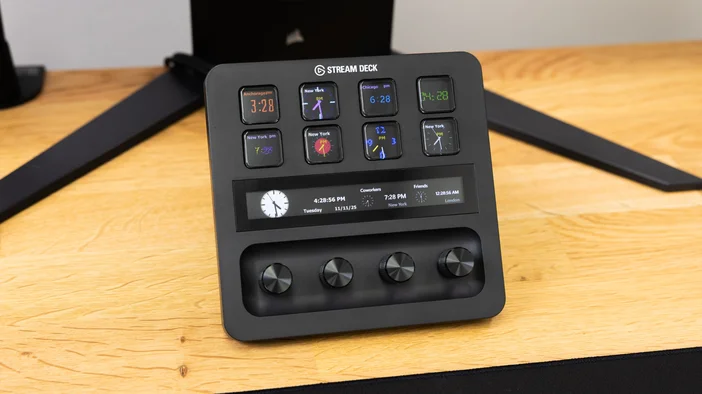
Display multiple time zones simultaneously on your Stream Deck keys or dials. Each clock updates in real-time, giving you instant visibility into what time it is anywhere in the world. Whether you're scheduling meetings with coworkers in different countries, coordinating raids with guild members, or checking in on friends across the globe, you'll always know the right time without mental math.
Customizable Display Styles
Choose from over 30 clock appearance styles to match your workflow and visual preferences. Select between analog or digital displays, switch between 12-hour or 24-hour time formats, and personalize colors to match your style. Your Stream Deck becomes a personalized world clock tailored exactly how you need it.
Interactive Dial Control
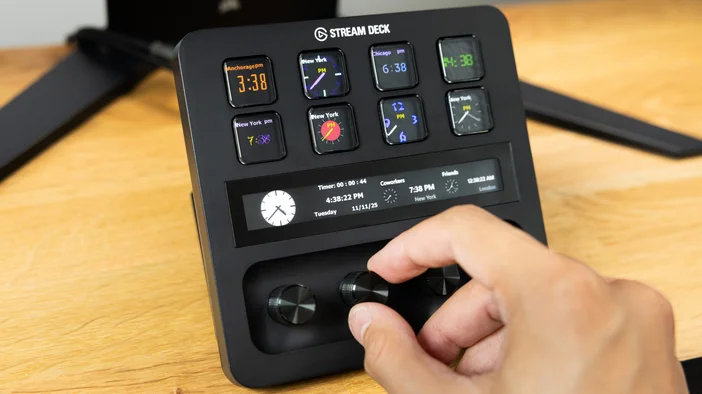
On Stream Deck +, turn your dial to cycle through multiple locations instantly or adjust countdown timers with ease. To use the countdown timer feature, simply checkmark "Use Timer" in the property inspector, then turn the dial to set your desired duration and watch as it counts down every second. Push the dial to toggle date visibility on or off. Perfect for time-boxing tasks, tracking meeting durations, keeping presentations on schedule, or timing anything from breaks to cooking.
Stream Deck Actions
Clocks plugin includes versatile actions for both keys and dials to keep you synchronized across the globe.
Clocks (Key Action)
Display a custom analog or digital clock on any Stream Deck key. Choose your preferred time zone, select from over 30 appearance styles, and customize colors to match your setup. Show or hide the date and weekday as needed. Short-press the key to toggle date visibility on or off, or cycle through multiple selected locations.
World Clock (Key Action)
Displays time zones from around the world on your Stream Deck keys. Select multiple locations and customize each display independently. Perfect for creating a dedicated time zone dashboard that shows all your important regions at once.
Clocks (Dial Action)
Configure multiple locations and turn the dial on Stream Deck + to cycle through each time zone smoothly. Push the dial to show or hide the date instantly.
Alternatively, enable the built-in timer mode to transform your dial into a countdown timer. Turn the dial to increase or decrease the timer duration, and push to show or hide the date. When timer mode is active, the dial controls timer adjustments instead of cycling through locations, giving you focused control over whatever timing matters most in the moment.
World Clock (Dial Action)
Designed specifically for location cycling on Stream Deck +. Add multiple time zones, then turn the dial to smoothly scroll through each location. Push the dial to toggle date visibility.
How to Set It Up
Using Stream Deck with Clocks plugin is fast and easy.
- First, get Clocks plugin for Stream Deck, available on Elgato Marketplace.
- Once installed, you'll find the clock actions on the right side panel in Stream Deck software. Drag and drop your chosen action onto a Stream Deck key or dial.
- In the property inspector on the right, select your desired time zone and display style. For dial actions, check off multiple locations to enable cycling through them with a dial turn.
- Customize additional settings like showing/hiding the date, choosing between analog or digital displays, selecting from over 30 appearance styles, and personalizing colors.
- For the Clocks dial action on Stream Deck +, decide whether you want to enable timer mode for countdown functionality or leave it disabled to cycle through locations.
- Now you're ready to interact with your clocks, press keys to toggle date visibility, turn dials on Stream Deck + to cycle locations or adjust timers, and push dials to show or hide dates.
Stay Synchronized, Stay Connected
This isn't just about knowing what time it is; it's about staying in sync with the people who matter, no matter where they are. From business meetings to gaming sessions, your timing stays perfect without the mental math. Time zone tracking just got effortless.
With Stream Deck and Clocks plugin, you stay on schedule. No calculations, no confusion, just instant awareness of any time zone you need, plus countdown timer functionality when you need to track a specific duration.
Download Today
The Clocks plugin is available for free on Marketplace. To get started, download the plugin below.
PRODUCTS IN ARTICLE