At Elgato, we're dedicated to empowering creators with tools that make complex workflows simple. Since launch, Wave Link has redefined audio mixing for streamers, podcasters, and professionals alike. Now, with Wave Link 3.0, we've taken everything we've learned and rebuilt the app from the ground up: faster, more flexible, and open to everyone.
Free for Everyone
You read that right: Wave Link 3.0 is open to everyone.
Unlike previous versions, you don't need an Elgato microphone, interface or Stream Deck + to use it. Plug in any mic or audio interface, and you're ready to mix.
But of course, there are still perks to using Elgato gear. Wave Link 3.0 includes deep device support, enabling tight hardware integration and control.
Download it now and take control of your audio, no strings attached.
Completely Redesigned Interface
Wave Link 3.0 has been rebuilt from the ground up with new design concepts and native frameworks on both Windows and macOS. The interface is faster, navigation is more fluid, and everything is easier to find.
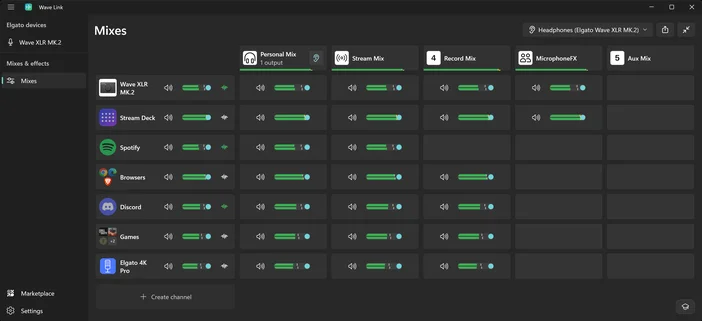
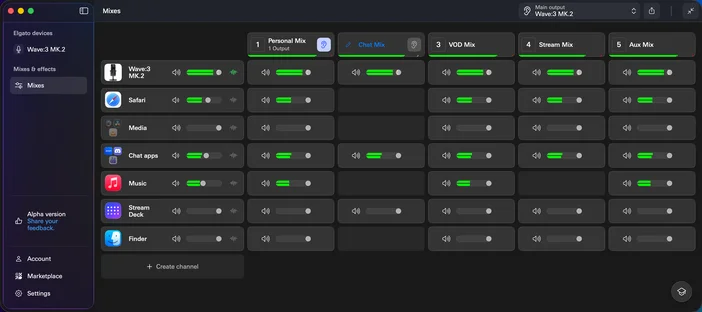
When you launch Wave Link 3.0 with an Elgato microphone or interface, a first-time setup tour walks you through the basics. The redesigned Device View keeps all your Elgato hardware settings organized and easy to access.
Routing Table
One of the most requested features is here: the routing table. Instantly see how audio flows through your setup, with inputs on the left (mics, apps, and capture cards) and output mixes along the top. Want to send an input to a mix? Just click the plus button and you're done.
Expanded Inputs & Powerful Output Mixes
Wave Link 3.0 supports up to 4 Elgato Wave devices in a single setup, plus up to 8 more channels for apps and other audio sources, like third-party mics, audio interfaces, and capture cards. Each channel can hold as many apps as you need, so you can group Discord and Zoom in one channel and Spotify and your browser in another.
Configure up to 5 independent output mixes, each with its own routing and volume levels. Perfect for audience mixes, VOD tracks, Discord feeds, or dual-PC setups with Wave Cast. Mixes can be renamed, given custom icons, and sent to multiple hardware outputs at once. Each output plays one mix at a time.
Using Wave XLR Pro? Its mixes run on the device itself, with per-mix extras like Ducking and Mix Maximizer. Our Wave XLR Pro dual-PC guide shows how it all fits together.
Audio Effects
With support for VST3 on Windows and Audio Unit effects on macOS, Wave Link 3.0 is a full digital audio processor. Effects are applied per input, to hardware and software inputs alike, and carry through to every mix that input feeds. Effects can be installed from Elgato Marketplace directly in Wave Link 3.0, or you can bring your own. Here's how to install effects from Marketplace.
Out now
Wave Link 3.0 is available now for Windows 11 and macOS 15.0 or newer. We can't wait for you to try it, share your feedback, and help us shape the future of audio for creators everywhere.
PRODUCTS IN ARTICLE
Stay up to date with Elgato. Get our latest News, Guides, and Product Updates in your Google feeds.
Add Elgato as a preferred sourceWas this article helpful?
Feedback received
Thanks for helping us improve this article.