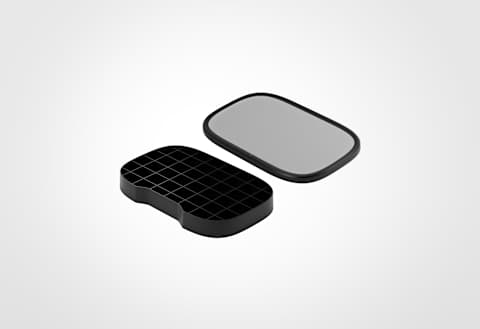
Key Light Air MK.2 (Light Only)
15-inch LED panel
Subtotal
Subtotal
Fits where other panels can't.
No visible LEDs. Just soft, even light.
MagSafe on the back lets you move between setups in seconds.
*MagSafe mount shown for illustration only — not included
Three 1/4" threads. Mount it however you need.
Less spill, more control. See it in action.
/Explorer/new/Key_Light_Air_MK.2-What_you_need_to_know.png)
Improve how you look on camera with Key Light Air MK.2, a mid-sized LED panel with USB-C power, touch controls, and a clamp-on desk mount.
/Explorer/new/Key_Light_vs_Key_Light_Air_MK.2.png)
Key Light Air MK.2 vs Key Light: compare brightness, power, size, and mounting to find the right light for your setup.
/Explorer/new/Key_Light_Air_vs_Key_Light_Air_MK.2.png)
See how Key Light Air MK.2 improves on Key Light Air with more brightness, USB-C power, touch controls, and a new desk clamp mount.
/Explorer/new/Which_light_is_right_for_you.png)
Not sure which Key Light fits your desk? Compare Key Light Neo, Key Light Air MK.2, and Key Light by brightness, size, and mounting.
/Explorer/new/Key_Light_Neo_vs_Key_Light_Air_MK.2.png)
Key Light Air MK.2 vs Key Light Neo: compare brightness, size, and mounting to find the right light for video calls or your desk.
/Explorer/new/Key_Light_Air_MK.2_-_Focus_Grid.png)
Learn what a focus grid does and how it gives you more control over where your light lands on camera.
/Explorer/new/What_are_Lumens.png)
Lumens measure how much light a panel can produce. Here's how to use lumen ranges to choose between Elgato Key Light models for your setup.
/Explorer/new/What_is_Color_Temperature.png)
What is color temperature and why does it matter for streaming and video calls? A simple guide to Kelvin, white balance, and lighting setup.
/Explorer/new/How_to_Control_Your_Key_Light_with_Stream_Deck.png)
Learn to control Key Light brightness and color temperature from Stream Deck keys, dials, or a free mobile option.
/Explorer/Key_Light_Air_MK.2_Article_10.png)
Adjust brightness, color temperature, and save presets directly on Key Light Air MK.2 with its built-in touch controls. No app or Wi-Fi needed.
/Explorer/new/Key_Light_Air_MK.2_-_Quick_Start_Guide.png)
Quick start guide for setting up and using Elgato Key Light Air MK.2.
What’s the difference between Key Light Air and Key Light Air MK.2?
Does it come with a power adapter?
Do I need a power adapter?
Can I power the light through MagSafe?
Is the P30 Power Supply available in my region?
How many lights do I need?
Do I need to use the stand?
Will the clamp fit my desk?
Where should I place my light for the best results?
Does it require special software?
Do I need Wi-Fi to control it?
What can I adjust on the light?
Can I use it for travel or on-location shoots?
| Power Source | Brightness | Percentage |
| 27W+ | ~2100 lm | 100% |
| 20W+ | ~1270 lm | 80% |
| 15W+ | ~750 lm | 60% |
| 7.5W+ | ~400 lm | 40% |
| Under 7.5W | ~180 lm | 20% |
/In%20The%20Box/Key-Light-Air-MK2-No-Mount--In-The-Box-Shot.png)
Our goal is to be 100% plastic-free. We're at 95% and counting. Since launching our first capture device in 2012, we’ve taken impressive strides not only in advancing our technology but also our packaging. Learn More