You've probably heard the difference between someone who sounds like they're talking into a laptop mic and someone who sounds like they belong on a podcast. Wave FX is designed to close that gap. It's the audio processing engine built into every new Wave device, developed in partnership with LEWITT, and it delivers polished, consistent sound from the moment you plug in.
Wave FX is one piece of a larger system. Wave Link 3.0 handles routing and mixing at the software level, and Wave FX processes your audio directly in hardware. Combined with Stream Deck, you get hands-on control over your entire audio workflow.
What does Wave FX actually do?
Wave FX handles three things in one continuous signal path:
- Clipguard 2.0 prevents distortion before it happens, so you never have to worry about clipping when you get loud.
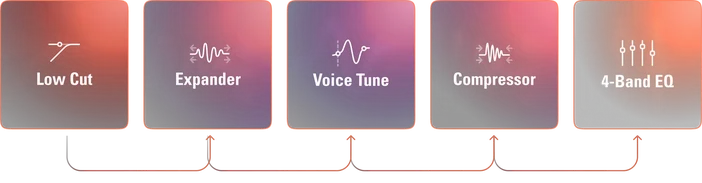
- DSP effects shape your voice directly on the device. Low-Cut Filter, Expander, Voice Tune, Compressor, and Equalizer run on a dedicated chip with zero-latency monitoring.
- VST Inserts let you add audio effects like reverb or voice effects, and every app on your system receives the result automatically.
Because all three stages are connected in a single chain, your voice flows through each one in order. What comes out is clean, processed audio that works the same in every app, whether you're in OBS, Discord, Zoom, or anything else.
Clipguard 2.0: Never worry about clipping again
We've all had that moment. You laugh too hard, react to a jump scare, and your audio distorts. That's clipping, and once it happens, there's no undoing it.
Most people deal with this by turning their gain down. It keeps things safe, but makes your voice quieter than it should be.
Clipguard 2.0 takes a different approach. It uses three stacked analog-to-digital converters running at different gain stages, and merges them into a single 32-bit float signal. Because the converters work together across a wide dynamic range, the system captures clean audio even during sudden volume spikes. There's no single point where your voice can overload the input. You just set your gain where your voice sounds best using Auto Gain Wizard, and Clipguard handles the rest.
We pushed it into some extreme scenarios to see how far it could go before breaking. It didn't.
DSP effects: Better sound without the guesswork
Untreated microphone audio picks up everything. Room rumble, fan noise, keyboard clicks, and the natural ups and downs of your voice. Fixing this normally means configuring effects in your streaming app or a plugin host and hoping everything is set correctly.
Wave FX runs effects directly on a chip inside our Wave devices. That means two things: you hear your processed voice in real time through your headphones with zero delay, and your sound stays consistent no matter what.
Here's what's available:
- Low-Cut Filter cleans up low-frequency rumble from things like desk vibrations and air conditioning.
- Expander quietly reduces background noise between your sentences without cutting off the start of your words.
- Voice Tune adds warmth and fullness to your voice with a single slider. To learn more, check out our Voice Tune guide.
- Compressor evens out volume differences so quiet words come through clearly and loud moments stay controlled.
- Equalizer lets you fine-tune your voice across four frequency bands for more clarity or warmth.
Wave XLR Pro adds two exclusive DSP effects:
- Ducking, which automatically lowers background audio when you speak
- Mix Maximizer, which boosts output loudness without clipping.
All DSP effects are managed through Wave Link, and you can use Auto Gain Wizard to get your levels set before dialing in your effects.
VST Inserts: Your Audio Effects, everywhere
If you use VST or Audio Unit plugins for reverb, noise removal, or voice effects, you know the usual setup: route through a plugin host, output to a virtual mic, and configure each app to use it. It works, but it's one more thing to manage.
Wave FX Inserts simplify this. Wave FX Processor connects directly to Wave Link via a dedicated, high-speed interface. Your audio routes to Wave Link for plugin processing, then gets inserted back into the hardware signal flow before reaching your apps. Any app that uses your Wave device as its input gets the result automatically. No virtual microphones, no extra routing.
Elgato Marketplace has a growing library of effects built for Wave Link, and you can also load your own third-party plugins.
For a full breakdown of how VST Inserts work, check out our breakdown.
Note: VST effects may introduce additional latency depending on your setup.
Common problems Wave FX solves
Audio distortion from getting loud: Clipguard 2.0 captures your voice across multiple gain stages using stacked ADC converters and 32-bit float processing. Even sudden shouts come through clean.
Background noise between sentences: The Expander and Low-Cut Filter work together to reduce fan noise, room rumble, and keyboard sounds without affecting your voice.
Inconsistent sound across apps: Effects are applied in hardware before your audio reaches any application, so every app gets the same processed signal.
Complex VST routing: VST Inserts handle plugin processing within the signal path. No virtual audio cables or background apps needed.
Monitoring delay with effects: DSP effects run on the device, so you hear yourself processed in real time with zero latency.
Which devices include Wave FX
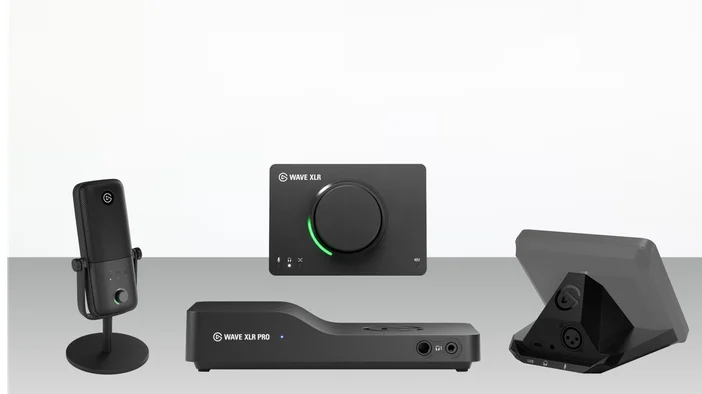
Wave:3 MK.2 is a USB condenser mic with a cardioid capsule tuned with LEWITT, onboard DSP, Clipguard 2.0, and VST Insert support. Auto Gain Wizard simplifies setup, and two monitoring modes let you hear your DSP-processed or fully integrated audio with VST effects applied. It's the simplest way to get started with Wave FX.
Wave XLR MK.2 is a mic interface that brings any XLR microphone into the Wave ecosystem with Wave FX processing. It delivers 80 dB of clean gain, 48V phantom power, and 135 dB of dynamic range, supporting everything from sensitive condensers to gain-hungry broadcast dynamics.
Wave XLR Pro is a hardware audio matrix with two fully independent XLR inputs, five hardware-based mixes, and the full Wave FX suite including Ducking and Mix Maximizer. It supports headphones up to 600 ohms, includes Standalone Mode for operation without a computer, and ships Q2 2026.
XLR Dock MK.2 is an XLR mic interface designed exclusively for Stream Deck +, combining Wave FX with Stream Deck's customizable keys and dials. It includes 80 dB of clean gain, 48V phantom power, and an upgraded headphone amplifier with dual mix modes. XLR Dock requires Stream Deck + and does not operate as a standalone device.
Each device uses the same Wave FX Processor, so the experience and sound quality are consistent across the Wave ecosystem.
Part of a larger workflow
Wave FX processes your audio at the hardware level, but it's designed to work as part of a connected system. Wave Link 3.0 provides routing, mixing, and effects management at the software level. Combined with Stream Deck, you get hands-on control over levels, muting, effects, and mix switching without opening any software.
Whether you're starting with a single mic or building out a more complex setup, Wave FX gives you consistent, processed audio across every app from the moment you plug in.