If you rely on a numpad for games, apps, or everyday workflows, the absence of one is noticeable almost immediately. Once it’s gone, those same inputs move to the top of the keyboard or onto a laptop-style layout.
With Stream Deck, those inputs can live on clearly labeled keys that stay in the same place every time. It also makes it easier to remember these numbers at a glance, whether it’s used alongside a keyboard or as a replacement.
From there, the layout can be shaped to match how you use a numpad day to day.
Assign Numpad Keys
Many games and applications treat the number row and numpad as separate inputs, even though they look identical.
When assigning keys, it’s important to select the dedicated numpad inputs rather than pressing keys directly on your keyboard. Using the input dropdown ensures the correct commands are sent every time.
To map a numpad key:
- Drag System → Hotkey onto a Stream Deck key
- Click the Hotkey field and open the input dropdown instead of pressing a key
- Choose Numpad, then select the specific input, such as Numpad 1 or Numpad Enter
- Repeat this for each number or function you want to include
On smaller devices like Stream Deck Mini and Stream Deck Neo, you can spread the numpad across Pages to make room for all the keys you need.
Setting up a Dedicated Profile
A numpad works best when it lives in its own profile. Keeping the numpad in its own profile makes it easier to find when you need it and keeps the rest of your layout unchanged.
To create a dedicated profile:
- Open the Stream Deck software
- Click the profile drop-down at the top of the window
- Select New Profile
- Give it a name like “Numpad”
Once the profile is created, it can be brought up in a few different ways. You can switch to it manually, assign it to a Stream Deck key for quick access, or link it to a specific game or application so it appears automatically with Smart Profiles. Keeping the numpad separate also makes it easier to adjust over time as your layout evolves.
Making Room with Folders
Space can fill up quickly, especially on smaller Stream Deck models. Folders solve this by letting one key open a secondary page of actions.
Extra number keys, symbols, or functions like plus, minus, and enter can live inside folders without cluttering the main layout. This keeps the numpad clean and readable while still leaving room to expand.
Over time, folders also make it easier to layer in app-specific or game-specific shortcuts without rebuilding the entire profile.
Add Icons for Clarity
Icons are what give a Stream Deck numpad its identity. Each key can be styled in a way that makes the layout easy to recognize at a glance and consistent with the rest of your setup.
When a numpad input is assigned using the Hotkey action, the key will initially show a generic Hotkey icon. Applying a custom icon replaces that default look entirely, letting the full key reflect the number or function you want it to represent.
Icons can be added in a couple of ways. Packs from Elgato Marketplace offer ready-made number designs, or create your own icons, making it easy to match a specific game, app, or overall theme.
Whether you keep things simple or fully themed, icons make it easy to customize how your numpad looks and feels.
Galleon 100 SD Numpad Profile
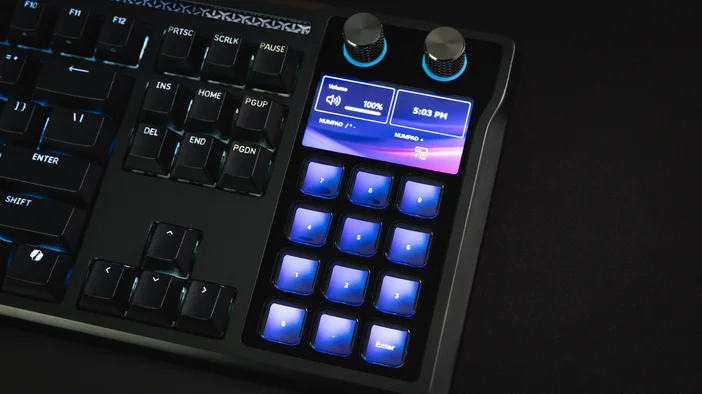
If you are worried about losing a traditional numpad on GALLEON 100 SD , the built-in Stream Deck keys let you recreate a familiar layout with room to customize.
You can map Numpad 1 through Numpad 9 exactly where you expect them, then place keys like period, plus, minus, multiply, or divide inside a folder or on a second page. This keeps the main layout clean while preserving the full numpad experience, with the added benefit of icons and per-game customization.
If you want to get started faster, you can also download a prebuilt GALLEON 100 SD numpad profile from Elgato Marketplace and adjust it to fit your setup instead of building everything from scratch.
Putting It All Together
A Stream Deck numpad gives you clear, labeled number controls that are easy to reach and easy to customize. With profiles, folders, and icons, you can build a layout that fits how you play or work.
The same setup works on a standalone Stream Deck or even on GALLEON 100 SD . From there, it is easy to expand with additional keys or shortcuts as your needs change.
PRODUCTS IN ARTICLE