Wave FX Processor ger Wave-hårdvaran professionell ljudbearbetning. Voice Tune är en av de inbyggda DSP-effekterna som ger din röst en sändningsliknande närvaro med en enda kontroll.
Om dina inspelningar låter tunna eller behöver finslipas, kombinerar Voice Tune kompression och harmonisk mättnad för att fylla den luckan.
Hur Voice Tune fungerar
Voice Tune är inspirerat av hur analoga bandspelare formar ljudet. Bandet komprimerar naturligt de högre delarna av signalen och introducerar en subtil harmonisk distorsion. Dessa egenskaper ger klassiska inspelningar deras densitet och karaktär.
Voice Tune återskapar detta beteende med hjälp av en maskininlärd algoritm. Modellen har tränats av en erfaren inspelningstekniker från LEWITT Audio, Elgatos partner för utvecklingen av Wave FX Processor. Den analyserar din insignal i realtid och justerar dynamiskt kompressionen och den harmoniska mättnaden utifrån hur du har ställt in kontrollen.
Vid lägre inställningar ger Voice Tune en subtil finputsning. Högre inställningar ger en mer uttalad karaktär som liknar den i radio- och TV-sändningar. Eftersom algoritmen anpassar sig efter din röst när du talar, reagerar den naturligt istället för att tillämpa en fast bearbetningskurva.
Hör det i praktiken
Hör skillnaden som Voice Tune gör.
Var Voice Tune sitter i signalkedjan
Voice Tune körs på Wave FX-processorn tillsammans med andra inbyggda DSP-effekter. Dessa effekter tillämpas i en fast ordning.
På Wave:3 MK.2, Wave XLR MK.2 och XLR Dock MK.2 (5 effekter):
- Lågpassfilter
- Expander
- Röstinställning
- Kompressor
- Equalizer
På Wave XLR Pro (7 effekter):
- Lågpassfilter
- Expander
- Röstinställning
- Kompressor
- Equalizer
- Ducking
- Mix Maximizer
När signalen når Voice Tune har Low-Cut Filter redan tagit bort lågfrekventa störningar och Expander har reducerat bakgrundsljudet. Voice Tune formar sedan den renade signalen, och du har fortfarande Equalizer tillgänglig efteråt om du behöver justera specifika frekvenser.
Eftersom allt detta körs på själva hårdvaran blir det ingen extra fördröjning. Du hör det bearbetade resultatet i dina hörlurar i realtid.
Proffstips: Voice Tune har redan komprimering, så det kan ersätta din vanliga kompressor för de flesta användare.
Justera Voice Tune i Wave Link
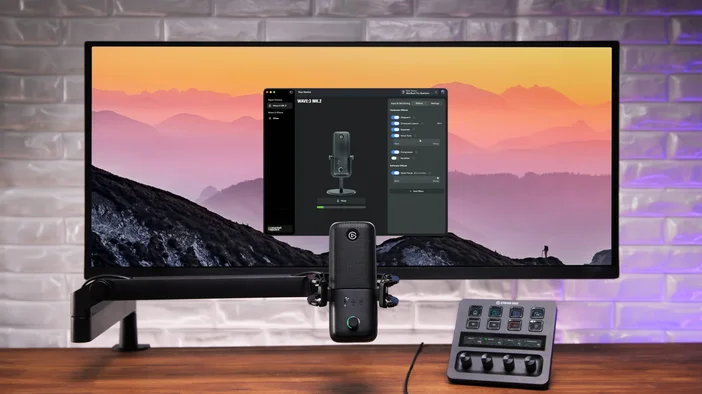
Wave Link ger dig full kontroll över Voice Tune och alla inbyggda DSP-effekter. Öppna Wave Link, välj din mikrofon eller ditt gränssnitt i panelen till vänster och gå sedan till fliken Effekter. Aktivera Voice Tune och använd skjutreglaget för att ställa in intensiteten från 0 till 100 %.
Alla Wave-enheter med Wave FX-processor använder samma Voice Tune-algoritm. Dina inställningar synkroniseras mellan Wave Link och enhetens inbyggda kontroller, så att justeringar som görs på någon av platserna återspeglas överallt.
Justera röstinställningen på din enhet
Du kan också styra Voice Tune direkt från din hårdvara utan att öppna Wave Link.
På Wave:3 MK.2: Tryck på multifunktionsratten för att bläddra igenom de tillgängliga parametrarna. När LED-ringen indikerar Voice Tune, vrid ratten för att justera nivån direkt. LED-ringen visar en färgövergång från orange (subtila inställningar) till rött (maximal intensitet), vilket ger dig visuell feedback när du justerar.
På Wave XLR MK.2: Tryck på kontrollratten för att växla till Voice Tune och vrid den sedan för att justera nivån.
På XLR Dock MK.2: XLR Dock MK.2 integreras med Stream Deck +, så du styr Voice Tune via Stream Decks rattar och LCD-tangenter. Detta gör att du kan se parametervärden och göra justeringar utan att behöva växla till Wave Link.
Om Wave XLR Pro: Wave XLR Pro har inga fysiska reglage på enheten. Alla Voice Tune-justeringar görs via Wave Link. Du kan valfritt koppla ihop den med Stream Deck för praktisk kontroll över Voice Tune och alla åtta inbyggda DSP-effekter.
Om du använder Auto Gain Wizard är Voice Tune en av de effekter som initialiseras under kalibreringen baserat på dina röstegenskaper. Du kan fortfarande justera Voice Tune-nivån manuellt efteråt i Wave Link eller på din enhet.
Vilka enheter stöder Voice Tune?
Voice Tune finns tillgängligt på alla Wave-enheter med Wave FX-processor:
- Wave XLR Pro
- Wave XLR MK.2
- XLR-dockningsstation MK.2
- Våg: 3 MK.2
Alla fyra enheterna använder samma Voice Tune-algoritm. Dina inställningar hanteras i Wave Link och bearbetas via hårdvaran i realtid.
Läs mer
För att utforska hela utbudet av DSP-effekter som finns tillgängliga på Wave-hårdvara, kolla in vår översikt över Wave FX Processor.