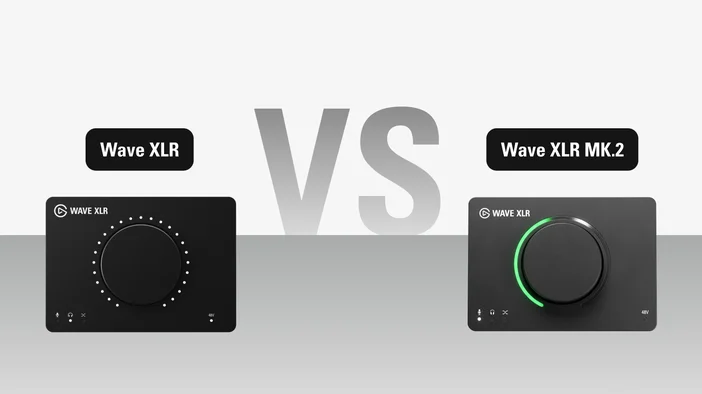
Wave XLR and Wave XLR MK.2 both bring your XLR microphone into a fully digital workflow with phantom power, tap-to-mute, and Wave Link integration. The original delivers clean, reliable audio with Elgato's signature Clipguard protection. MK.2 builds on that foundation with onboard effects processing, a redesigned signal path, and smarter controls. Both are priced at $169.99. Here's how they compare.
| Wave XLR | Wave XLR MK.2 | |
| Price | $169.99 | $169.99 |
| XLR Input | ✅ | ✅ |
| Phantom Power | +48V | +48V |
| Sample Rate | 48 / 96 kHz | 48 kHz |
| Bit Depth | 24-bit | 24-bit |
| Wave FX Processor | — | ✅ |
| Clipguard | 1.0 | 2.0 |
| DSP Effects | — | ✅ |
| VST Insert | — | ✅ |
| Capacitive Mute | ✅ | ✅ |
| Hardware Dial | Gain, Headphone Volume, Mic/PC Mix | Gain, Voice Tune, Headphone Volume, Mic/PC Mix |
| LED Ring | ✅ | ✅ |
| Headphone Output | 3.5mm stereo | 3.5mm stereo |
| Headphone Output Power | Most studio & gaming headsets | High-impedance studio headphones |
| Wave Link | 2.0, 3.0 | 3.0 |
| Voice Focus | — | ✅ |
| Stream Deck Integration | ✅ | ✅ |
| Connection | USB-C | USB-C |
Wave FX Processor
The biggest addition in Wave XLR MK.2 is Wave FX Processor, an onboard audio engine developed with LEWITT Audio. It runs Clipguard, DSP effects, and VST plugins in one continuous signal path, so you get processed audio with responsive monitoring and none of the routing complexity.
Wave XLR does not include Wave FX Processor, so its audio path is simpler: clean signal in, clean signal out. That's perfectly fine if you prefer to handle effects in your DAW or don't need processing at all.
To learn more about Wave FX Processor check out our guide here.
Clipguard 1.0 vs Clipguard 2.0
Both versions of Wave XLR include Clipguard, but the technology behind them is different.
Clipguard 1.0 on the original Wave XLR uses a second audio path running at a lower gain alongside the primary one. If the main signal is about to clip, the device intelligently uses the secondary audio to prevent distortion.
Clipguard 2.0 on Wave XLR MK.2 takes a layered approach with three stages of protection: stacked ADC converters capture your signal at multiple gain levels simultaneously, internal 32-bit float processing provides massive headroom so volume spikes never hit the digital limit, and digital limiters smooth out sudden peaks before they reach your system. The result is 135 dB of dynamic range compared to 100 dB on the original (120 dB with Clipguard enabled).
For a deeper look at how Clipguard 2.0 works, check out our Clipguard 2.0 guide.
Onboard DSP effects
Wave XLR MK.2 runs five DSP effects directly on the hardware: Low-Cut Filter, Expander, Voice Tune, Compressor, and Equalizer. Because they process on Wave FX Processor rather than your computer, you hear your processed voice in real time through your headphones, and the effects follow your mic to every app without extra configuration.
Wave XLR does not have onboard DSP. You can still apply effects through Wave Link on your computer, but they won't be processed on the hardware.
To learn how each effect shapes your sound, check out our Wave FX guide.
VST Insert
Wave XLR MK.2 supports third-party audio plugins (VST on Windows, Audio Unit on macOS) through a dedicated low-latency path. Plugins run on your computer via Wave Link and are inserted directly into the hardware signal chain, so every app that uses your mic receives the processed audio automatically.
Wave XLR does not support VST Insert. To learn more, check out our VST Insert guide.
More gain, more headroom
Wave XLR MK.2 provides 80 dB of clean gain, up from 75 dB on the original. That extra 5 dB makes a real difference with gain-hungry dynamic microphones like the Shure SM7B, where every decibel counts. No booster needed.
Auto Gain
New to Wave XLR MK.2, Auto Gain Wizard analyzes your voice and automatically sets the optimal gain level. Press and hold the dial for five seconds, or activate it through Wave Link.
Headphone amp
Both models include a 3.5mm headphone jack for direct monitoring. Wave XLR MK.2 upgrades the amplifier with High Power Mode, delivering enough output to drive high-impedance studio headphones. The original works well with most gaming and studio headsets but may struggle with higher-impedance models.
Monitoring modes
Wave XLR MK.2 offers two ways to balance your mic against computer audio in your headphones. Linear Mic Mix keeps PC audio at 100% while you adjust mic monitoring from 0-100%. Mic/PC Mix works like a crossfader, increasing one while decreasing the other.
In Wave Link's self-monitoring settings, you can also toggle "Include software effects" on or off. When disabled, you hear your voice with hardware DSP effects and zero latency. When enabled, you hear your complete processed sound including VST effects, though this may add latency depending on your system.
Control dial and LED ring
Both models feature a multifunction dial with LED ring and capacitive mute. On Wave XLR MK.2, the dial adds a Voice Tune mode alongside gain, headphone volume, and mic/PC mix. The LED ring on MK.2 provides continuous RGB feedback with customizable colors for each mode, so you can see gain levels, metering, and Voice Tune intensity at a glance.
Note: Wave XLR MK.2 has a removable faceplate, just like our original Wave XLR. However, faceplates from each model are not compatible with one another.
Should you upgrade?
If you already own Wave XLR, it still works great with Wave Link 3.0 and Stream Deck. You get full software mixing, Clipguard 1.0 protection, and 96 kHz recording support. If that covers what you need, there's no rush.
Wave XLR MK.2 is worth the upgrade if you want onboard effects processing, Clipguard 2.0's expanded protection, Auto Gain, VST plugin support, or a stronger headphone amp. The addition of Wave FX Processor means your audio is processed on the hardware itself, so effects follow your mic to every app without extra setup.
PRODUCTS IN ARTICLE