Wave XLR Pro can connect to multiple devices at once and send different audio to different places at the same time. That flexibility is what makes it work for dual-PC streaming, console gaming, podcasting, and more. But it also means there are a lot of possible signal paths, and it helps to understand what each connection does before you start plugging things in.
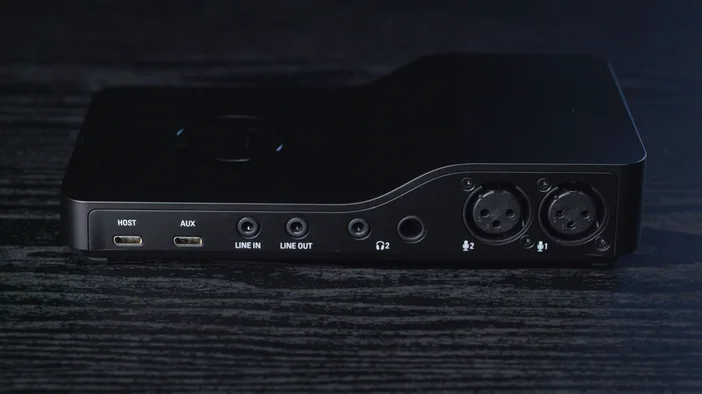
Two USB-C Ports: HOST and AUX
On the back of Wave XLR Pro, you'll find two USB-C ports labeled HOST and AUX. Both carry audio in and out at the same time, but they work very differently.
HOST: Your Streaming or Primary PC
HOST is your main connection. This is the computer where Wave Link runs, where you configure your mixes and effects, and where you get full control over everything Wave XLR Pro can do.
When you plug your streaming or primary PC into HOST, it sees Wave XLR Pro as a full audio system. Your computer can send up to eight separate audio channels into the mixer: System, Music, Browser, Voice Chat, SFX, Game, Aux 1, and Aux 2. Each gets its own volume control in Wave Link
Your computer also receives audio back from Wave XLR Pro. It gets the individual hardware inputs, like your microphone and anything connected to Line-in or AUX, as well as the finished mixes you've built. Your streaming software, recording app, or video call can pick up whichever audio source or mix it needs.
HOST requires Wave Link 3.0, and works with Windows 11 or later and macOS 14.2 or later.
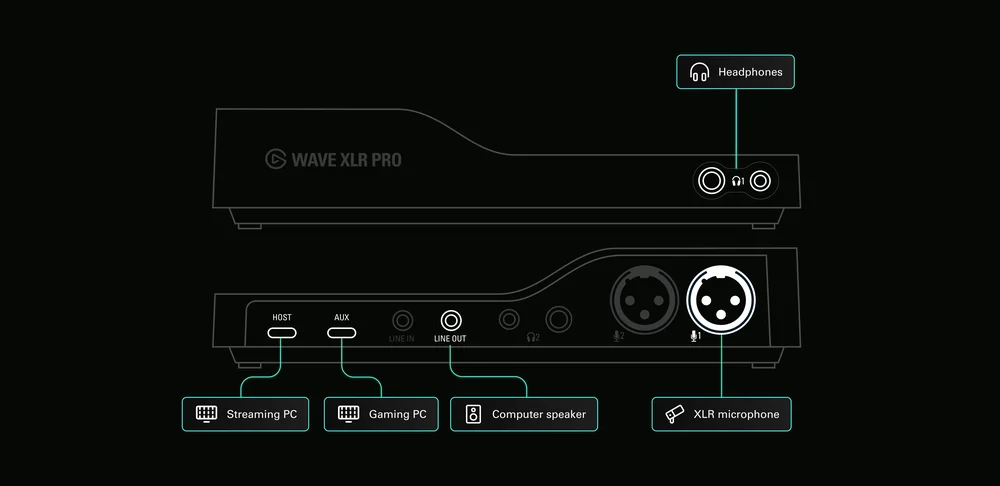
AUX: Your Gaming PC, Console, or Secondary Device
AUX is the simpler connection. Think of it as a second computer plugged into Wave XLR Pro, but without the complexity.
When you plug a gaming PC, console, phone, or laptop into AUX, that device sees Wave XLR Pro the same way it would see a USB headset. It gets one stereo audio input (for hearing your mic and any other audio you choose to send it) and one stereo audio output (for sending its audio into the mixer). No drivers, no software, no setup on that device. Just plug in and it works.
Even though AUX keeps things simple for the connected device, everything it sends into Wave XLR Pro becomes fully mixable. Game audio flows into the mixer as its own channel, and you can adjust its volume, include it in some mixes and exclude it from others, and blend it with audio from your HOST computer, all from Wave Link.
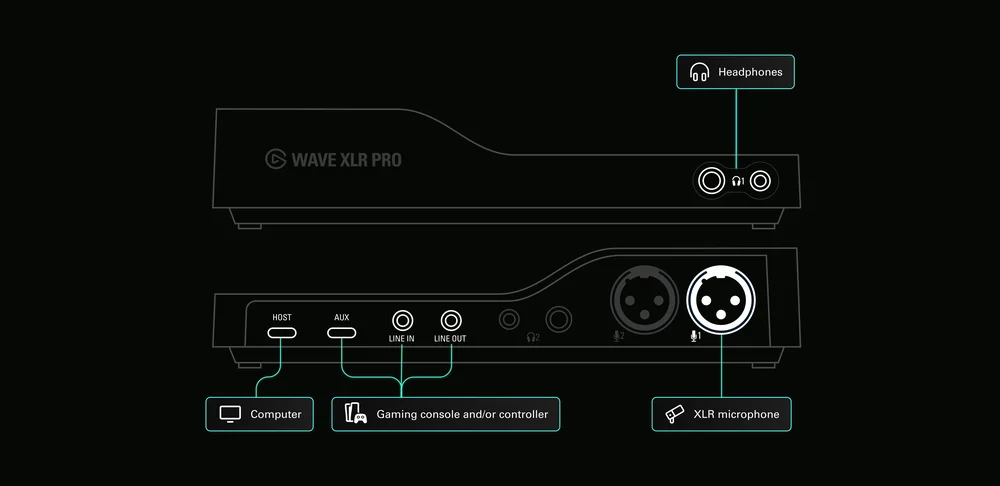
Both Ports at the Same Time
Your streaming PC stays connected via HOST with full mixing control. Your gaming PC on AUX just sees a simple audio device it can send game audio to and receive mic audio from. The onboard mixer handles everything in between.
If your primary PC is off, AUX can also power Wave XLR Pro on its own. This puts the device into Standalone Mode, where all your saved settings, routing, and effects stay active. Your mic still works and your secondary device still gets everything it needs. Especially useful for console gaming sessions where you want your XLR mic with full DSP processing for party chat without turning on your PC.
Line-in: Another Way to Connect a Console
In addition to AUX, Wave XLR Pro has a 3.5 mm Line-in on the back panel. This stereo analog input gives you another path for connecting devices like a gaming console or controller.
Some setups use both at the same time. You might connect the console itself via AUX for USB audio while running a 3.5 mm cable from your controller for its audio output. Both signals flow into the mixer as separate channels, giving you independent volume control over each.
Line-in also works on its own for any device with a standard headphone or line-level output. If your console or controller has a 3.5 mm jack and you want to keep AUX free for another device, Line-in is a straightforward alternative.
Two Headphone Outputs: Front and Back
Wave XLR Pro has two headphone outputs, one on the front panel and one on the back. Each output has both a 3.5 mm and a 6.3 mm jack side by side, and both drive headphones up to 600 ohms, covering everything from earbuds to high-impedance studio headphones.
The reason for two: each output can carry a different mix. Two people can listen to different audio at the same time from the same device.
If you're podcasting with a co-host, you might want to hear your own voice a little louder for confidence while your co-host hears theirs louder in their mix. If you're streaming a console game, you could use one output for your gaming headset and keep the other for monitoring what your stream actually sounds like.
You assign a mix to each output in Wave Link. Once configured, the device handles the rest in hardware with zero latency. Headphone 1 on the front gives you easy access for daily use, while Headphone 2 on the back keeps cables tidy for a co-host or producer sitting nearby.
Putting It Together
Between the two USB ports, line-in, line-out, and two headphone outputs, Wave XLR Pro can handle multiple devices and two listeners at the same time, all through one compact unit. Your HOST computer runs the show with full mixing control. Your AUX device plugs in and just works. And each person listening gets exactly the audio they need in their headphones.
Everything from here, which mixes you build, which effects you apply, and how you route specific audio sources, is configured in Wave Link. But the physical connections are the foundation, and once you understand what HOST, AUX, Line-in, Line-out, and the two headphone outputs do, the rest falls into place.
PRODUCTS IN ARTICLE