Wave XLR is how we brought XLR microphones into the Wave ecosystem. Wave XLR Pro takes that foundation further with two independent XLR preamps, onboard effects, five hardware mixes, and advanced routing, all powered by Wave FX Processor.
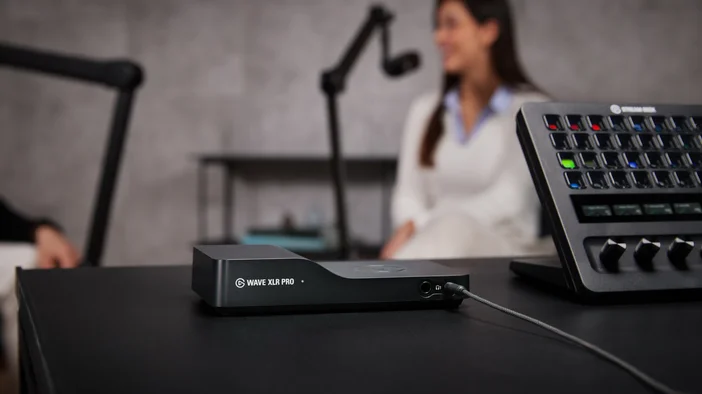
Two-person podcasts, dual-PC streaming, multi-output production. Wave XLR Pro keeps it all in one signal chain. All settings are managed through Wave Link, and pairing with Stream Deck adds hands-on control.
Powered by Wave Link
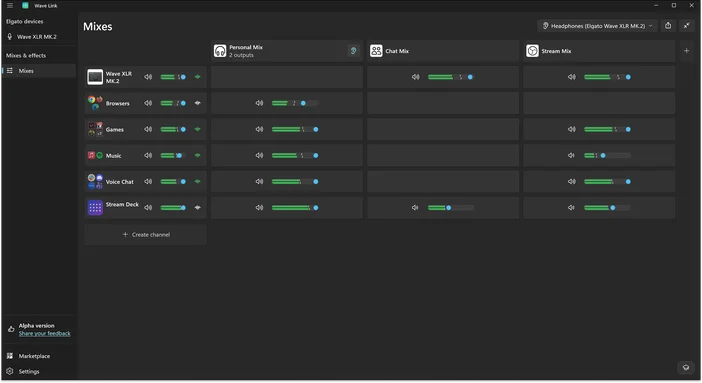
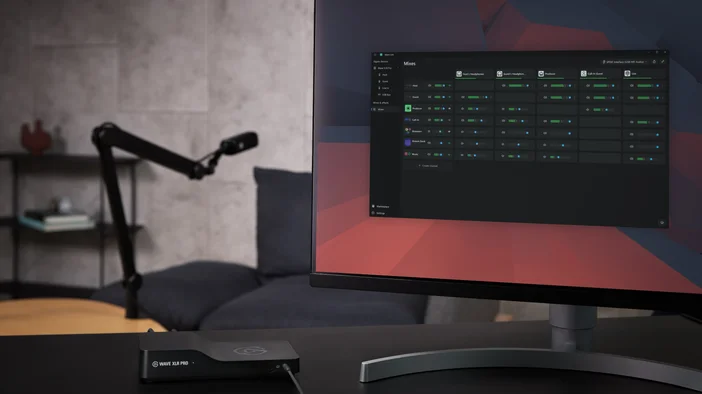
Wave XLR Pro requires Wave Link 3.0 or newer, free audio routing and mixing software for macOS and Windows. Wave Link is where you configure mixes, apply effects, manage routing, and control every setting on the hardware. When paired with Wave XLR Pro, it unlocks direct access to all device controls and Wave FX Processor settings.
Wave Link is available at elgato.com/downloads.
Wave FX Processor
Wave FX Processor, developed in partnership with LEWITT Audio, brings together three key technologies in one unified signal chain: Clipguard 2.0, onboard DSP effects, and VST Insert support. Your mic sounds the same across every app because processing happens at the hardware level before the signal reaches your system.
Clipguard 2.0 Prevents Distortion
Clipped audio is permanent. Once your signal distorts, it cannot be fixed in post. Clipguard 2.0 uses a layered hardware architecture to prevent distortion before it happens, keeping unexpected laughs, raised voices, and excited reactions clean. Turn it on once in Wave Link and forget about it.
To learn more about how Clipguard works, check out our guide on Clipguard 2.0.
Onboard DSP Effects
Wave XLR Pro runs professional audio effects directly on the hardware with zero-latency monitoring:
- Low-Cut Filter removes low-frequency rumble from desk vibrations and ambient noise.
- Expander gently reduces background noise while leaving your voice untouched.
- Voice Tune adds warmth and presence with a blend of compression and harmonic saturation. To learn more, check out our guide on Voice Tune.
- Compressor balances your audio so quiet moments are audible and loud moments stay controlled.
- Equalizer sculpts your voice across four bands to add clarity, reduce muddiness, or shape your tone.
- Ducking automatically lowers background audio when you speak, applied per mix so your stream gets ducked while your headphone mix stays full.
- Mix Maximizer boosts loudness while preventing clipping, applied independently to each of the five output mixes for broadcast-level impact.
- Channel Booster pushes any input up to +12 dB beyond the standard ceiling when a source is too quiet, activated per channel.
All eight effects can run simultaneously on the hardware. When monitoring through the dedicated headphone outputs, you hear your processed voice in real time with zero latency.
VST Insert
Wave FX Processor connects directly to Wave Link through a dedicated low-latency path. Your audio routes to Wave Link for plugin processing, then gets inserted back into the hardware signal chain before reaching your apps. Effects like noise suppression, reverb, or voice changers work in every application without virtual microphones or extra routing.
To learn more, check out our guide on VST Insert or find additional audio effects at Elgato Marketplace.
Note: VST effects may introduce additional latency depending on your setup.
Drive two XLR microphones with 80dB of gain
Wave XLR Pro delivers 80 dB of ultra-low-noise gain per input, enough to drive even the quietest dynamic microphones like the Shure SM7B, Electro-Voice RE20, and Rode PodMic without needing external boosters or cloudlifters.
Both inputs include 48V phantom power for condenser microphones like the Audio-Technica AT2020, Rode NT1, and AKG C214. Enable phantom power per input through Wave Link. It stays disabled by default to protect dynamic mics.
Auto Gain Wizard
If you are not sure where to set your gain, Auto Gain Wizard analyzes your voice and automatically sets the optimal level. Speak at your normal volume for about five seconds through Wave Link, and the system adjusts gain and initializes DSP effects based on your voice characteristics.
Dual USB-C for multi-device setups
Wave XLR Pro has two USB-C ports that serve different roles.
- USB-C Host connects to your main computer. One cable handles power and audio.
- USB-C Aux connects a second PC, gaming console, or phone with plug-and-play simplicity and no drivers needed. Both ports run at the same time, and USB-C Aux can also power Wave XLR Pro in Standalone Mode when your main PC is off.
Five Independent Hardware Mixes
Wave XLR Pro runs up to five independent mixes simultaneously, all processed on the hardware. Each mix can receive a different combination of inputs at different levels with different effects routing. Run a personal monitoring mix in your headphones, a stream mix with ducking applied, and a separate recording mix for post-production, all at the same time.
Monitor What Matters
Wave XLR Pro includes two headphone outputs, each with both 6.3 mm and 3.5 mm jacks side by side, making it easy for two people to monitor independently.
Because effects processing happens on the hardware, you hear your fully processed voice in real time. In Wave Link, FX Select lets you choose what each listener hears, from raw unprocessed audio to the full effects chain including VST plugins. Each headphone output can receive a different mix.
Standalone Mode
Once you configure your mixes, effects, and routing in Wave Link, Wave XLR Pro saves those settings to the hardware. Power it through USB-C Aux via a console or USB charger, and it keeps running with your saved configuration and DSP effects active. Useful for console gaming sessions where your PC is off.
Analog I/O
Wave XLR Pro includes stereo line input and line output on 3.5 mm TRS jacks. Line In brings audio from external gear like field recorders, mixers, or cameras into Wave Link as a routable source. Line Out sends your processed mix to external devices for recording, camera feeds, or additional monitors.
Stream Deck Integration
For hands-on control, pairing Wave XLR Pro with Stream Deck gives you tactile access to your entire signal chain. Adjust volume levels, mute individual inputs, trigger effects, and switch between mixes in real time. Wave Link handles routing and mixing, Wave FX Processor handles audio processing, and Stream Deck gives you physical control over all of it.
Get started
Dual XLR inputs with 80dB of gain, onboard DSP and VST Insert powered by Wave FX Processor, Clipguard 2.0 protection, and up to five independent hardware mixes in a device that fits in your hand.
Wave XLR Pro will be shipping in Q2 at elgato.com. In the meantime, download Wave Link for free at elgato.com/downloads and explore audio effects on Elgato Marketplace.
PRODUCTS IN ARTICLE