Whether you are streaming, editing, managing audio, gaming, or running a live broadcast, some setups ask for more controls than a standard Stream Deck can hold. Stream Deck + XL is the largest in the lineup, with 36 LCD keys, 6 multifunction dials, and a touch strip, giving you room to keep everything visible and within reach.
Stream Deck + XL uses the same app, plugins, and profiles as every other Stream Deck, so your existing setup carries over. You just have a lot more room to build with.
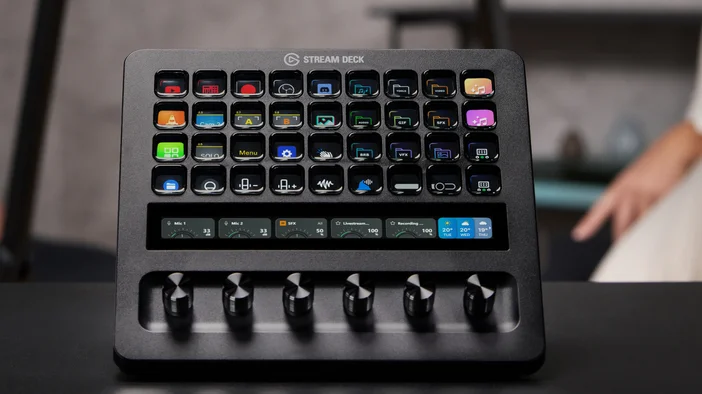
36 keys to access your tools with one tap
Every key is a customizable LCD screen that shows what it does and updates in real time. Assign commands, launch apps, trigger shortcuts, or control your favorite tools across your entire setup.
When your workflow spans multiple apps, having more keys means less time searching and more time doing. Keep everything you need visible and organized, so you are not flipping through pages or switching profiles just to find a single action.
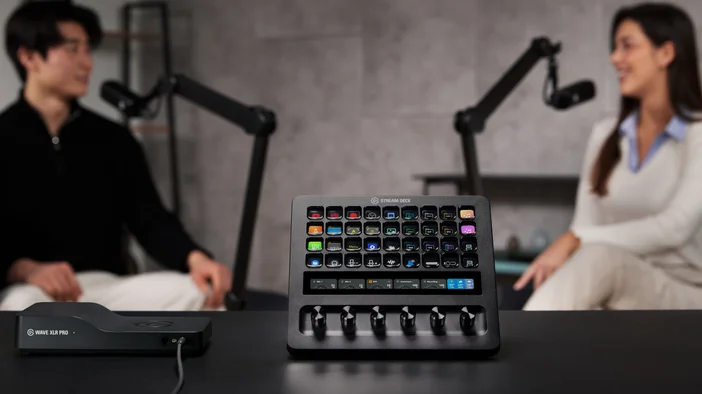
6 dials and a touch strip for control
Dials handle the things that work better with a turn than a tap. Audio levels, timeline scrubbing, color correction, zoom, anything that benefits from incremental adjustment. Each dial is a 360-degree encoder with a push function, so it can handle multiple types of input.
Advanced dial features in Stream Deck app let you get even more from each dial. Dial Stacks let you layer multiple actions on a single dial and push to switch between them. Action Wheel cycles through key actions on a single dial. Action Trigger maps different actions to each dial movement, including push, turn left, and turn right.
The touch strip sits above your dials and shows what each one is controlling. See audio levels, lighting brightness, playback position, or zoom values at a glance without opening an app or switching windows.
Hundreds of plugins
Plugins bring your tools together in one place. Whether you are working with OBS Studio, Elgato Key Light, Spotify, or Twitch, there is a plugin that adds direct control to your keys and dials. Stream Deck + XL also works with Bitfocus Companion and Buttons, opening up control for hundreds of broadcast and production systems.
Browse hundreds of plugins on Elgato Marketplace, many of them free, with new ones added regularly.
Pages, folders, and profiles to stay organized
You are not limited to 36 actions. Pages and Folders let you expand and organize your layout as your setup grows. Profiles give you completely separate layouts for different apps, projects, or workflows, and Smart Profiles switch automatically when you open a specific app.
Pre-made profiles are available on Elgato Marketplace if you want to get started quickly.
Optional accessories
Network Dock adds Ethernet connectivity so you can place Stream Deck + XL anywhere on your network, away from your computer. Mount it anywhere and power it via PoE or USB for a clean, single-cable installation.
USB Hub adds two USB-C ports, two USB-A ports, and an SD card reader to your setup. It also charges your laptop at up to 65W, keeping your desk clean and connected. An external USB-C power supply is required.
Not sure which Stream Deck is right for you? Check out the Stream Deck device comparison guide for a full breakdown.
Note: XLR Dock & XLR Dock MK.2 are designed for the original Stream Deck + and are not compatible with Stream Deck + XL.
Get it today
36 keys, 6 dials, a touch strip, and hundreds of plugins to tie it all together.
Stream Deck + XL is available at elgato.com.
PRODUCTS IN ARTICLE