Plugins
Wave Link Plugin for Stream Deck: Hands-On Control for Your Audio Mix
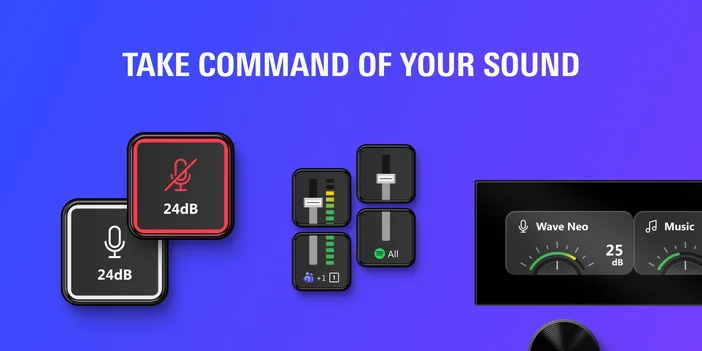
Wave Link plugin turns Stream Deck into a hands-on control surface for your entire audio setup. Adjust volume, mute channels, toggle effects, and switch outputs from your keys and dials, all without leaving what you're working on.
Your mix, at your fingertips
Whether you need quick volume control or full routing flexibility, each action handles a specific part of your mix
Wave Control
Adjust the gain, output volume, or mic/PC monitoring mix on your Wave device.
This is the fastest way to control your mic without opening Wave Link. If your gain is too hot during a call or you need to shift your monitoring balance mid-stream, one press or dial turn handles it. You can mute, set a specific value with smooth fading, or adjust by steps.
Audio Effect
Toggle hardware effects on your Wave device on or off with a single tap.
This covers effects powered by Wave FX Processor, including noise suppression, EQ, compression, and Clipguard. Useful when you want to activate a voice effect at a specific moment during a stream or compare your processed and unprocessed sound in real time.
Channel Level
Control any channel in your Wave Link mix with a visual fader that appears directly on your Stream Deck key.
You can target a channel's main level across all mixes at once, or go mix-by-mix for more precise control. When a game suddenly gets loud or a chat app needs to come down a few notches, reach over and adjust it. On dials, you get smooth volume control with a press-to-mute shortcut.
Add to Channel
Route the currently focused app on your computer to a specific Wave Link channel.
If you launch a new game or open a browser and want it in your mix, just press the key. The app gets assigned to the channel you configured without switching windows. Stream Deck also shows you if the focused app is already routed or can't be added.
Channel Audio Effect
Toggle a specific audio effect on a Wave Link channel on or off.
This gives you direct control over individual VST or AU effects applied to any channel. Turn on reverb for a creative moment, disable noise suppression to check your raw signal, or lock an effect to always on or always off. Separate icons for each state let you see where things stand at a glance.
Mix Level
Mute or adjust any output mix in Wave Link independently from Stream Deck.
If you run separate mixes for your stream, recording, and monitoring, each one gets its own control. Mute your stream mix during a break or bring your monitoring mix down without affecting what your audience hears.
Mix Output Device
Switch which mix an output device is assigned to, or toggle it between two mixes.
This is useful when you want to reroute your headphones from your monitoring mix to your stream mix to check what your audience is hearing. You can toggle between two mixes or add and remove a device from a specific mix with a single press.
Output Control
Set the volume or mute any output device configured in Wave Link, including non-Wave hardware.
This works with headphones, speakers, monitors, or any other output your system recognizes. Turn your headphones down between rounds, mute your speakers before hopping on a call, or set a specific volume level with optional fading.
Main Output Device
Switch your main output device in Wave Link with a single tap.
Toggle between two devices like headphones and speakers, or set a specific device as your main output. No need to open Wave Link or dig through system audio settings every time you want to change where you're listening.
Dial controls for Wave Link
On Stream Deck +, Stream Deck + XL, and GALLEON 100 SD, Wave Control, Channel Level, Mix Level, and Output Control all support dial control. Spin to adjust, press to mute, and check levels on the display without looking at your screen.
Real-time feedback on keys and dials
Stream Deck keys and dials update in real time to reflect volume levels, mute states, and effect toggles across your entire mix. When Wave Link is minimized or running in the background, Stream Deck becomes an always-visible control surface for your audio setup.
Requirements
Wave Link plugin requires Wave Link 3.0 and Stream Deck app to be running.
Wave Link is free to download and works with any microphone or audio interface your computer recognizes. You don't need Elgato hardware to use Wave Link or the plugin, though Wave devices unlock additional controls, such as device controls and Wave FX Processor effects.
The plugin works on macOS and Windows with all Stream Deck devices, including Stream Deck Mobile.