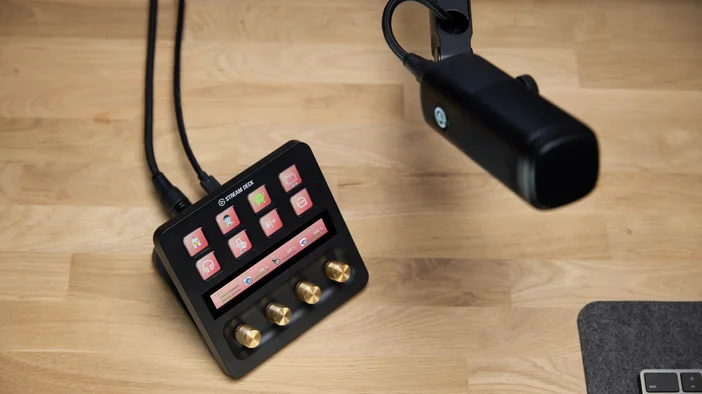
XLR Dock MK.2 bygger på fem års utveckling av Wave-ljud och förvandlar Stream Deck + till ett komplett ljudgränssnitt. Den fästs direkt på baksidan av Stream Deck +, så att du kan ansluta din XLR-mikrofon på baksidan medan alla kontroller finns på framsidan. Ingen extra USB-kabel, inget extra utrymme på skrivbordet.
Oavsett om du streamar, deltar i möten, spelar in poddar eller hanterar ljud vid ditt skrivbord, hanterar XLR Dock MK.2 förstärkning, fantommatning, ljudeffekter och övervakning på ett och samma ställe.
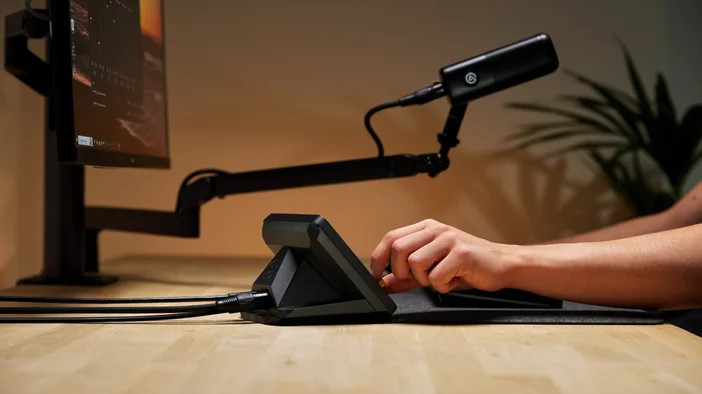
Obs: XLR Dock MK.2 är endast kompatibel med Stream Deck + och fungerar inte som en fristående enhet.
Wave Link förenar allt
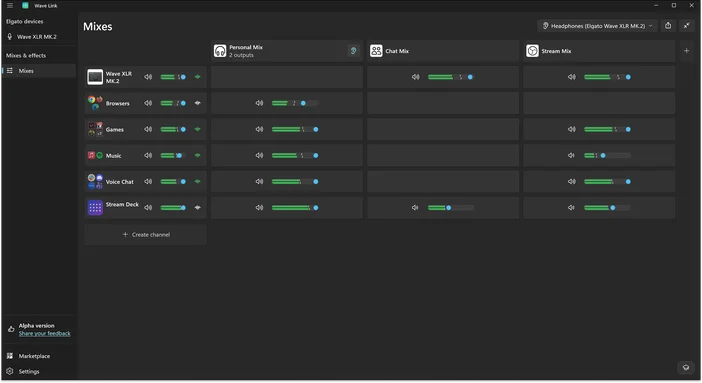
Wave Link är ett gratis ljudmixningsprogram som fungerar med alla mikrofoner. När det kopplas ihop med XLR Dock MK.2 möjliggör det en djupare integration, inklusive direkta hårdvarukontroller, automatisk förstärkningsinställning och Wave FX Processor-inställningar.
En av Wave Links mest kraftfulla funktioner är stödet för upp till 5 oberoende mixar. Skapa en personlig mix för övervakning, en streammix, en inspelningsmix och mycket mer. Varje mix får sin egen routing och sina egna nivåer. Applicera effekter på valfri ingångskanal för fullständig ljudkontroll.
Wave FX-processorn förenar din signal
Wave FX Processor, utvecklad i samarbete med LEWITT, förenar tre viktiga tekniker: Clipguard 2.0, inbyggda DSP-effekter och stöd för VST Insert. Alla tre fungerar i en enhetlig signalkedja, vilket innebär att din mikrofon låter likadant i alla appar du använder.
Lägg till plugins som brusreducering eller röstförändrare, så fungerar de automatiskt överallt utan virtuella mikrofoner eller komplex routing. Ditt ljud förblir konsekvent oavsett om du streamar, är i ett möte eller spelar in.
Clipguard 2.0 förhindrar förvrängning
Klippt ljud är permanent. När signalen förstörs kan den inte repareras i efterhand. Clipguard 2.0 använder ett trelagersskydd för att förhindra förvrängning innan den uppstår, så att oväntade skratt, höjda röster eller upphetsade reaktioner förblir rena. Clipguard körs på Wave FX Processor och fungerar tillsammans med alla DSP-effekter utan att lägga till latens.
Vi utsatte Clipguard för några extrema scenarier för att se hur långt det kunde gå innan det gick sönder. Det gjorde det inte.
För mer information om hur Clipguard fungerar, läs vår guide.
Inbyggda DSP-effekter
XLR Dock MK.2 kör professionella ljudeffekter direkt på hårdvaran. Effekterna bearbetar din röst vid källan med övervakning utan fördröjning:
- Lågpassfilter: Avlägsnar lågfrekventa vibrationer och oönskade ljud.
- Expander: Minskar bakgrundsljud på låg nivå utan att påverka din röst.
- Voice Tune: Lägger till varm, analog kompression och övertoner som anpassas efter hur du talar.
- Kompressor: Balanserar ljudet så att tysta stunder hörs tydligt medan höga stunder förblir kontrollerade.
- Equalizer: Skulptera din röst över fyra band för att lägga till värme, minska otydlighet eller förbättra klarheten.
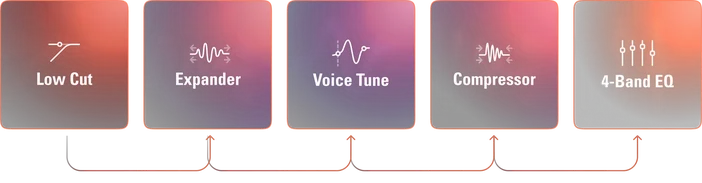
Alla fem effekter kan köras samtidigt på hårdvaran. För mer information om Wave FX, se vår guide.
VST-insats
Wave FX Processor ansluts direkt till Wave Link via en dedikerad väg med låg latens. Ditt ljud dirigeras till Wave Link för plugin-bearbetning och infogas sedan tillbaka i hårdvarans signalkedja innan det når dina appar. Effekter som brusreducering, reverb eller röstförändrare fungerar i alla applikationer utan virtuella mikrofoner eller extra routing.
För mer information, se vår guide om VST Insert eller hitta ytterligare ljudeffekter på Elgato Marketplace.
Observera: VST-effekter kan orsaka ytterligare fördröjning beroende på din konfiguration.
Driv alla XLR-mikrofoner
XLR Dock MK.2 levererar upp till 80 dB förstärkning. Det är tillräckligt med effekt för dynamiska mikrofoner som Shure SM7B utan att behöva en Cloudlifter. Kondensatormikrofoner får fantommatning vid behov, vilket du kan aktivera via Wave Link.
Den fungerar också med populära mikrofoner, inklusive Shure MV7 X, RØDE PodMic, RØDE Procaster, Electro-Voice RE20, Audio-Technica AT2020 och RØDE NT1.
Auto Gain hjälper dig att komma igång
Bra ljud börjar med rätt mikrofonvolym. Auto Gain Wizard analyserar din röst och ställer automatiskt in den optimala nivån. Tala med normal volym så justerar guiden förstärkningen och initialiserar DSP-effekter som Voice Tune baserat på dina röstegenskaper.
Detta eliminerar gissningar, särskilt om du är nybörjare när det gäller XLR-mikrofoner.
Styr ditt ljud från Stream Deck
Stäng av mikrofonen, justera ljudnivåerna, växla mellan effekter och växla mellan dina 5 mixar utan att öppna programvaran.
Du kan också styra exakt vad du hör i dina hörlurar. Välj vilka effekter du vill övervaka – lyssna på din råa mikrofonsignal, lägg till DSP-effekter som Voice Tune och EQ, eller dina ljudeffekter för att höra exakt vad din publik hör.
För mer information om hur du styr ljudet från Stream Deck, kolla in vår presentation av Wave Link-plugin.
En enhet, fullständig ljudkontroll
XLR Dock MK.2 ger Stream Deck + professionell ljudkvalitet utan att ta upp plats på skrivbordet. Din mikrofon, dina kontroller och din ljudbearbetning samverkar på ett och samma ställe. Anslut din mikrofon och börja forma ditt ljud redan idag.
- Resolution: 32-bit
- Sample rate: 48 kHz
- Frequency response (XLR input): max gain deviation 20 Hz – 20 kHz < 0.3 dB
- Frequency response (Headphone, 32 Ω): max gain deviation 20 Hz – 20 kHz < 0.3 dB
- Dynamic range: 135 dB
- Connectors: Microphone (XLR, mono), Headphone (3.5 mm jack, stereo), Host I/O (USB-C)
- Power consumption: rating print 900 mA max, measured 670 mA max
System Requirements
- Windows 11 or newer (x64 or ARM)
- macOS Sonoma 15.0 or newer
Product Weight and Dimensions
- Depth × width × height (mm): 115 × 137 × 76 mm
- Depth × width × height (in): 5.39 × 4.53 × 2.99 in