MANUAL | SNABBSTARTGUIDE
Elgato Stream Deck Network Dock — Quick Start Guide
Wired Ethernet Adapter, PoE or USB Powered, Easy On-Device Setup, Mounts to Desk, Wall, or SDXL Stand, For Studio, Broadcast, Events
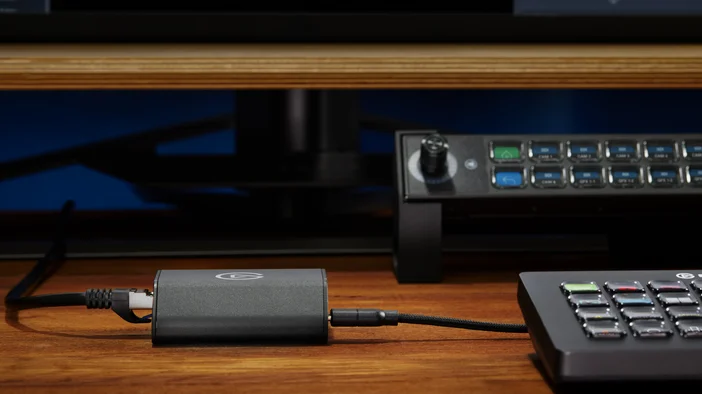
Connections
- Ethernet (RJ45): supports PoE IEEE 802.3af and non-powered networks
- Power Supply: USB-C, PD 3.0 or higher, 5 V, min. 0.9 A (4.5 W)
- Stream Deck: USB-C, USB 2.0, 5 V, max. 0.7 A (3.5 W)
Mounting Network Dock
Stream Deck XL
Attach the mounting adapter to the back of Network Dock using the included adhesive pad, positioning it as needed to align with your Stream Deck XL. Once in place, clip the dock into the center slot of the Stream Deck XL stand for a secure fit.
Mounting Bracket
Use screws or double sided adhesive tape (both not included) to mount the bracket where needed, then snap Network Dock into place.
Software
Download and install the Stream Deck app.
Setup
Connecting to PoE
Connect Network Dock to your PoE infrastructure using a network cable.
Then connect Network Dock to your Stream Deck using the provided USB-C cable.
Connecting to Ethernet (non-powered)
Connect Network Dock to your network using a network cable.
Then connect a Power Delivery 3.0-compatible power supply (min. 5V, 1A, not included) to the USB-C Power Delivery port.
Finally, connect Network Dock to your Stream Deck using the provided USB-C cable.
Getting Started
The device will power on automatically and acquire an IP address from your DHCP server (if enabled).
If your network doesn't use DHCP, set a static IP directly on Stream Deck.
In the Stream Deck software, go to Preferences -> Devices, and follow the on-screen instructions.
Federal Communication Commission Interference Statement
This device complies with Part 15 of the FCC Rules. Operation is subject to the following two conditions: (1) This device may not cause harmful interference, and (2) this device must accept any interference received, including interference that may cause undesired operation.
This equipment has been tested and found to comply with the limits for a Class B digital device, pursuant to Part 15 of the FCC Rules. These limits are designed to provide reasonable protection against harmful interference in a residential installation. This equipment generates, uses and can radiate radio frequency energy and, if not installed and used in accordance with the instructions, may cause harmful interference to radio communications. However, there is no guarantee that interference will not occur in a particular installation. If this equipment does cause harmful interference to radio or television reception, which can be determined by turning the equipment off and on, the user is encouraged to try to correct the interference by one of the following measures:
- Reorient or relocate the receiving antenna.
- Increase the separation between the equipment and receiver.
- Connect the equipment into an outlet on a circuit different from that to which the receiver is connected.
- Consult the dealer or an experienced radio/TV technician for help.
FCC Caution: Any changes or modifications not expressly approved by the party responsible for compliance could void the user's authority to operate this equipment
For questions about Elgato product compliance with FCC regulations, please contact: Compliance Officer, Corsair Memory Inc., 115 North McCarthy Blvd, Milpitas, CA 95035, USA
The declaration of conformity for Elgato products is available at www.elgato.com/doc
Corsair Memory Inc., 115 North McCarthy Blvd, Milpitas, CA 95035, USA
Corsair Memory BV, Wormerweg 8, 1311 XB, Almere, Netherlands
Corsair Components Limited, 1020 Eskdale Road, Winnersh Triangle, Wokingham, RG41 5TS, UK
Copyright 2016-2025 Corsair Memory Inc. All rights reserved. Elgato and the Elgato logo are trademarks of Corsair Memory Inc., registered in the U.S. and other countries. All other trademarks belong to their respective owner.
Customer Support: help.corsair.com • Part: 51GBW9901
Applicant Name (상호명): Corsair Memory, Inc.
Product Name (제품명칭): Stream Deck Network Dock
Model No. (모델명): 20GBW9901
Manufactured Year & Month (제조연월): Please refer to gift box sticker
Manufacturer & Origin (제조자 및 제조국가): Corsair Memory, Inc./Please refer to gift box sticker
A/S : (주)컴스빌, 1522-1460
KC Logo + "R-R-CSI-20GBW9901"
Stream Deck Network Dock