How To
Wave Link 3.0: How to use it for Productivity
Between video calls, notifications, and background music, desktop audio gets messy fast. Wave Link 3.0 lets you organize all of it, grouping apps into channels, controlling volume independently, and switching between saved mixes for different work situations. It's free on Windows and macOS, and works with any microphone.
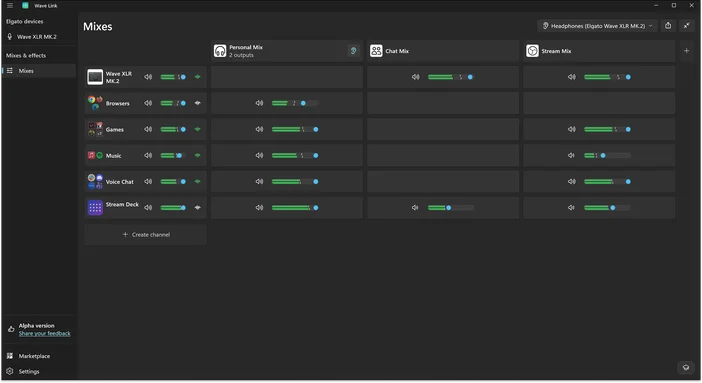
Organize audio by what it does, not what app it's from
Instead of managing audio app by app, Wave Link lets you group sources by purpose. Set up a channel for communication (Teams, Zoom, Slack), one for media (Spotify, YouTube), and one for system sounds (notifications, alerts). Each channel gets its own volume control, so you can mute all notifications without touching your music, or pull down every communication app at once when you need to focus.
Each channel can hold multiple apps, so even if you use five different tools for calls and messaging, they all live in one place. Wave Link supports up to 8 software input channels for apps and third-party microphones, and you can connect up to 4 Wave devices on top of that.
Set up mixes for the way you actually work
Mixes take channel grouping a step further. Think of a mix as a saved state for your entire audio layout. Wave Link supports up to five, each with its own volume levels, routing, and effects.
Meeting mix. Communication front and center. Music muted or pulled way back. Notifications off so nothing interrupts.
Focus mix. Music at a comfortable level. Communication and notifications muted completely. Nothing pulls you out of your work.
Casual mix. Everything at moderate levels. Good for lighter desk work or any time you want to stay reachable without being locked into a call.
You set each one up once. After that, switching takes a second. When a meeting starts, flip to your meeting mix. When it ends, switch back to focus. No re-adjusting five apps every time your context changes.
Sound clearer on calls
Wave Link lets you apply audio effects to your microphone using VST3 plugins on Windows or AU plugins on macOS. For work, the practical ones are noise suppression (to cut background sounds like keyboard clatter or fans), compression (to keep your volume consistent), and EQ (to reduce room rumble or add clarity).
You configure these once and they apply everywhere, whether you're on Teams, Zoom, or Google Meet. Elgato Marketplace has a growing library of effects you can browse and install directly within Wave Link, and any existing VST3 or AU plugins you already own work too.
For a deeper look, check out our guide on how to make your mic sound better.
Pair it with Stream Deck
If you have a Stream Deck, the redesigned Wave Link 3.0 plugin lets you mute channels, adjust volume, or switch mixes without opening Wave Link or leaving your current app. Tap a key to mute before a call, turn a dial to adjust music volume, or switch from focus to meeting mode in one press.
Our Wave Link 3.0 plugin is available on Elgato Marketplace.
Get started
Wave Link 3.0 is a free download at elgato.com. It works with any microphone or audio interface on Windows 11 and macOS 15 or newer.
For a full walkthrough, check out the Wave Link 3.0 software overview. To explore effects and routing in more detail, see our guide on how to download and use audio effects.