중간에 진행 중인데 모든 게 완벽하게 들린다. 그런데 채팅이나 기부 메시지에 웃음이 터져 나오면서 음량이 급상승하면 청중은 잡음만 들리게 된다. 그 순간은 사라지고 깨끗한 음질도 함께 사라진다. 아무리 편집이나 후처리를 해도 되살릴 수 없다.
클립가드 2.0은 Elgato Wave 기기에 내장된 Wave FX 프로세서가 제공하는 여러 기능 중 하나입니다. 이 기능의 역할은 명확합니다: 클리핑이 발생하기 전에 하드웨어 수준에서 이를 방지하여, 목소리가 깨끗하지 않을 때에도 오디오가 깨끗하게 유지되도록 합니다.
오디오 클리핑이란 무엇인가요?
클리핑은 오디오 신호가 마이크나 오디오 인터페이스가 포착할 수 있는 최대 레벨을 초과할 때 발생합니다. 음파의 전체 형태를 기록하는 대신 피크가 평평하게 잘려 나가 거칠고 삐걱거리는 왜곡을 만들어냅니다.
이는 단순히 오디오가 너무 큰 소리를 내는 것과는 다릅니다. 음량은 줄일 수 있습니다. 클리핑은 파형 자체에 영구적인 손상을 입히며, 녹음이나 생방송 중에 발생하면 이를 깨끗하게 되돌릴 방법이 없습니다.
기존 설정으로는 클리핑을 방지하기 어려운 이유
대부분의 오디오 인터페이스는 단일 아날로그-디지털 변환기와 수동 게인 노브를 사용합니다. 사용자는 평소 말소리 크기에 맞춰 게인을 설정하면, 변환기가 그 하나의 감도로 모든 소리를 포착합니다.
문제는 게인 설정이 타협점이라는 점입니다. 너무 낮게 설정하면 목소리가 얇거나 잡음이 심하게 들립니다. 가장 좋게 들리는 지점으로 설정해도 갑작스러운 큰 소리가 발생하면 컨버터가 처리할 수 있는 범위를 넘어설 수 있습니다. 이런 상황이 발생하면 신호는 소프트웨어 리미터나 이펙트가 반응할 기회조차 없이 변환 지점에서 클리핑됩니다.
이것이 바로 클리핑이 가장 중요한 순간에 발생하는 이유입니다: 큰 반응, 예상치 못한 웃음, 또는 예상보다 더 강한 존재감을 드러내는 게스트가 있을 때 말이죠.
Clipguard 2.0 작동 방식
클립가드 2.0은 세 가지 기술의 조합입니다: 적층형 ADC, 32비트 부동 소수점 처리, 디지털 리미터. 각각 신호의 서로 다른 단계를 처리하며, 함께 층층이 쌓인 방어 체계를 형성하여 클리핑을 사실상 불가능하게 만듭니다.
스택형 ADC는 과부하를 근원에서 차단합니다
단일 이득 레벨의 단일 변환기에 의존하는 대신, Clipguard 2.0은 서로 다른 감도로 설정된 세 개의 아날로그-디지털 변환기를 동시에 사용합니다. 첫 번째 변환기는 낮은 이득으로 설정되어 왜곡 없이 큰 피크를 처리합니다. 두 번째는 중간 이득으로 작동하여 일상적인 음성 레벨을 커버합니다. 세 번째는 높은 이득으로 설정되어 최소한의 노이즈로 조용한 디테일을 포착합니다.
세 개의 컨버터 모두 동일한 신호를 동시에 포착합니다. 특정 순간에는 최소한 하나 이상의 컨버터가 깨끗하게 신호를 포착하고 있습니다. 이들의 출력은 장치 내부에서 단일 신호로 통합되며, 총 동적 범위는 135dB입니다.
32비트 부동소수점 처리로 막대한 여유 공간 제공
합쳐진 출력은 32비트 플로트 신호로, 내부 처리 중 클리핑이 사실상 불가능할 정도로 여유 공간이 큰 오디오 포맷입니다. 바로 이 점이 아키텍처를 "클리핑 불가능"하게 만듭니다. 속삭임이든 고함이든, 결합된 결과물은 원본 사운드의 모든 디테일을 완벽히 보존합니다. 게인 조정부터 DSP 효과, 믹싱에 이르기까지 장치 내부의 모든 처리 단계는 출력에 도달하기 전 이 높은 여유 공간 신호를 기반으로 작동합니다.
디지털 리미터는 피크가 시스템에 도달하기 전에 이를 부드럽게 처리합니다
스택형 ADC와 32비트 부동소수점 헤드룸을 갖추더라도 신호는 결국 표준 24비트 오디오 스트림으로 장치 외부로 출력되어야 합니다. 바로 이 지점에서 디지털 리미터가 역할을 수행합니다.
첫 번째 리미터는 게인 스테이지 바로 뒤에 위치합니다. 이는 클립가드의 주요 보호 장치입니다. 음성이 갑자기 급증하면 게인이 동적으로 감소하고 레벨이 안정되면 정상으로 복귀합니다. 이 과정은 신호가 DSP 이펙트와 믹싱 단계에 도달하기 전에 발생하여 문제를 근원에서 차단합니다.
두 번째 리미터는 DSP 처리 및 믹싱 이후 신호 처리 체인의 하류에 위치합니다. 이 리미터의 역할은 신호가 24비트로 변환되어 헤드폰, 스트리밍 또는 녹음으로 전송되기 전에 이펙트나 믹스 레벨로 인해 발생할 수 있는 피크를 잡아내는 것입니다. 이 두 단계가 함께 작동하여 입력부터 출력까지 오디오를 보호합니다.
실제 작동 모습을 확인하세요
이제 작동 방식을 알았으니, 이를 무너뜨리려 할 때 어떤 일이 벌어지는지 보세요. 우리는 Clipguard 2.0을 마이크가 절대 맞닥뜨려서는 안 될 극한 상황까지 밀어붙였습니다. 그럼에도 불구하고, 클리핑을 거부했습니다.
클립가드 1.0 대 클립가드 2.0
원본 Wave:3, Wave XLR 또는 XLR Dock을 사용해 본 적이 있다면 Clipguard 1.0에 이미 익숙할 수 있습니다. 개념은 동일했습니다: 오디오가 클리핑되는 것을 방지하여 소중한 순간을 절대 놓치지 않도록 하는 것이었습니다. 그러나 그 기반이 되는 기술은 근본적으로 다릅니다.
클립가드 1.0은 단일 안전 장치를 사용했습니다. 보조 오디오 경로가 주 신호와 병행하여 낮은 게인 레벨로 작동했습니다. 주 신호가 클리핑 직전 상태가 되면 장치는 지능적으로 보조 오디오로 전환하여 왜곡을 방지했습니다. 이는 중간 정도의 볼륨 급상승에는 효과적이었으나, 고정된 게인 오프셋을 가진 단일 백업 경로에 의존하는 방식이었습니다.
클립가드 2.0은 다중 계층 아키텍처로 기존 방식을 완전히 대체합니다. 단일 백업 경로 대신 여러 ADC가 서로 다른 감도에서 신호를 동시에 캡처하여 135dB의 동적 범위를 가진 32비트 부동 소수점 신호로 변환합니다. 이후 디지털 리미터가 오디오가 장치를 떠나기 전 신호 체인의 두 지점에서 피크를 관리합니다.
실질적인 차이점: Clipguard 1.0은 클리핑이 발생하기 직전에 이를 포착했습니다. Clipguard 2.0은 클리핑을 유발하는 조건 자체가 존재하지 못하도록 사전에 차단합니다.
이것이 게인 설정에 미치는 의미
Clipguard 2.0은 시작부터 입력 신호의 전체 범위를 포착하므로, 사용자가 잘못 설정할 염려가 있는 아날로그 게인 조절 노브가 없습니다.
게인은 Wave Link 3.0을 통해 완전히 디지털 영역에서 제어됩니다. 취약한 아날로그 신호를 증폭하는 것이 아니라 깨끗한 32비트 부동소수점 신호를 조정하는 것입니다. 이는 예상치 못한 상황이 발생해도 왜곡 위험을 감수하는 일반적인 타협 없이, 음성이 가장 잘 들리는 지점에서 선명도와 존재감을 위해 게인을 설정할 수 있음을 의미합니다.
Wave Link의 Clipguard 설정
Wave Link 3.0에서는 Wave FX 처리가 가능한 장치의 하드웨어 설정 페이지에서 Clipguard 기능을 활성화하거나 비활성화할 수 있습니다.
활성화 시 두 리미터가 모두 작동하여 입력부터 출력까지 신호를 깨끗하게 유지합니다. 비활성화 시 입력 리미터는 우회됩니다. 출력 단계는 여전히 일부 보호 기능을 제공하지만, 소스에서의 클리핑을 방지하는 주요 안전 장치는 상실됩니다.
특정 이유로 끄지 않는 한, 클립가드를 켜두세요. 이는 사운드에 영향을 주거나 음질을 저하시키지 않습니다. 필요할 때만 작동합니다.
지원되는 장치
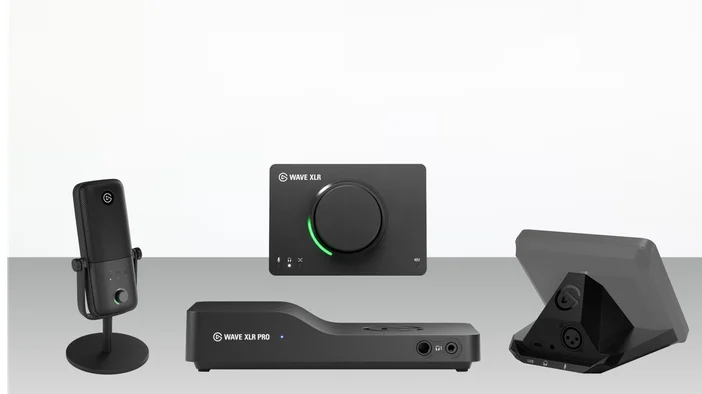
Clipguard 2.0은 다음 Wave 기기에서 사용할 수 있습니다:
- Wave:3 MK.2 — 온보드 DSP 탑재 USB 콘덴서 마이크
- Wave XLR MK.2 — 싱글 채널 XLR 오디오 인터페이스
- Wave XLR Pro — 듀얼 채널 XLR 오디오 매트릭스
- Stream Deck + MK.2용 XLR 도크 — Stream Deck +용 XLR 오디오 도크
Clipguard 1.0은 기존 Wave:3, Wave XLR 및 Stream Deck +용 XLR Dock에서 계속 사용할 수 있습니다.
Wave Link 및 해당 기기와의 연동 방식에 대한 자세한 내용은 Wave Link 3.0 소프트웨어 개요를 참조하십시오.
가장 중요한 순간에
다음에 채팅 메시지에 너무 크게 웃을 때도 음성은 깨끗하게 유지됩니다. Wave Link에서 게인을 한 번 설정하고, Clipguard를 켜둔 채 콘텐츠에 집중하세요.
전체 분석을 살펴보려면 Wave FX 개요를 확인하세요.