すべてのセッションにPCが必要とは限りません。スタンドアローンモードでは、Wave XLR Proがミキシング、マイク処理、オーディオ出力のすべてを単独で実行します。
PCなしでミックスを継続して実行する
ほとんどのオーディオミキサーは、コンピューターの電源を切るか接続を解除した瞬間に動作を停止します。Wave XLR Proは違います。スタンドアローンモードにより、ミキサーは独立して動作を継続します。DSPエフェクトは有効なまま、ルーティングは維持され、オーディオは設定した通りに正確に流れ続けます。
時にはPCを起動せずにゲームを始めたり、リラックスしたい時もあるでしょう。デュアルPC環境を使っている場合、ストリーミング用PCを起動する必要がない場面も多々あります。スタンドアロンモードなら、Wave XLR Proはどちらの状態でも動作を継続します——マイクの処理が行われ、ミキシングが実行され、ヘッドホンから音声が流れ続けるのです。どちらのマシンにも触れずに。
仕組み
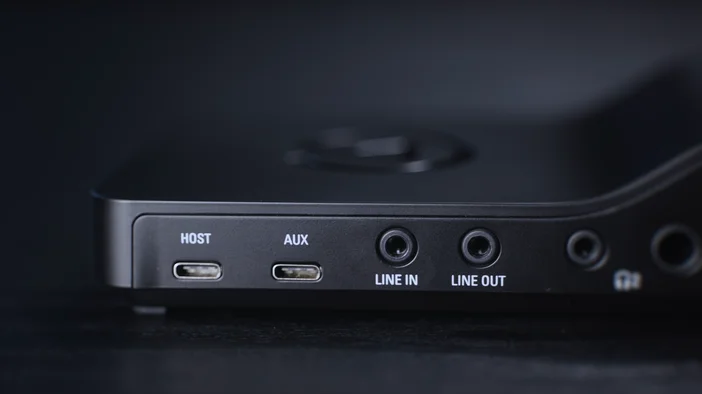
Wave XLR Proには2つのUSB-Cポートが搭載されています。USBホストはコンピューターとの主要接続用です。Wave Linkの接続や、ミックス設定、ルーティング、DSPエフェクトの設定はこちらで行います。USB Auxはコンソール、スマートフォン、または2台目のPCなどの二次ソース用で、シンプルなプラグアンドプレイ接続が可能で、ドライバーは不要です。
どちらのポートからもWave XLR Proをスタンドアローンモードで駆動可能です。USBホストに電源アダプターやモバイルバッテリーを接続するか、コンソールや充電器からUSB Aux経由で給電しても結果は同じです。Wave XLR Proが起動すると、スタンドアローンモードのプロファイルが自動読み込みされ、デバイスは独立して動作します。マイク処理が適用され、エフェクトが有効化され、通常通りミックス出力が可能です。
スタンドアロンモードで有効なままのもの
スタンドアロンで動作する場合、Wave XLR Proは前回Wave Linkに接続した際の保存済み設定を保持します。これにはコンプレッション、EQ、Voice TuneなどのDSPエフェクトが含まれます。ミキシングルーティングと出力アサインメントも同様に保持されます。
VSTプラグインは、デバイス本体ではなくコンピューター上で動作するため、スタンドアローンモードでは利用できません。これらはホストマシンへの常時接続を必要とします。
Wave Linkに関する注記
Wave LinkはWave XLR Proのミキシングエンジンを設定するために必要です。Wave FX ProcessorがClipguard 2.0、DSPエフェクト、VSTインサートを処理し、Wave Linkでこれら全てを制御します。ただし、設定が完了すればWave Linkを起動したままにする必要はありません。ルーティングと処理はデバイス本体に常駐するため、スタンドアローンモードに移行しても全てが自動的に引き継がれます。
例外:スタンドアローンモードではVSTインサートは有効になりません。これはコンピュータの動作に依存するため、Wave Linkが起動していない場合、VSTは処理チェーンから外れます。Clipguard 2.0およびDSPエフェクトは有効なままです。