MANUAL | GHID DE START RAPID
Elgato Key Light Neo — Quick Start Guide
Installation
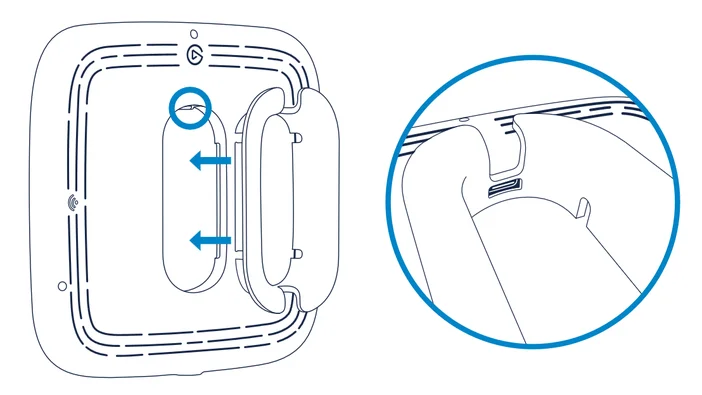
Step 1
Click the cable reel into the back of Key Light Neo. Make sure the cutout aligns with the USB-C port.
Step 2
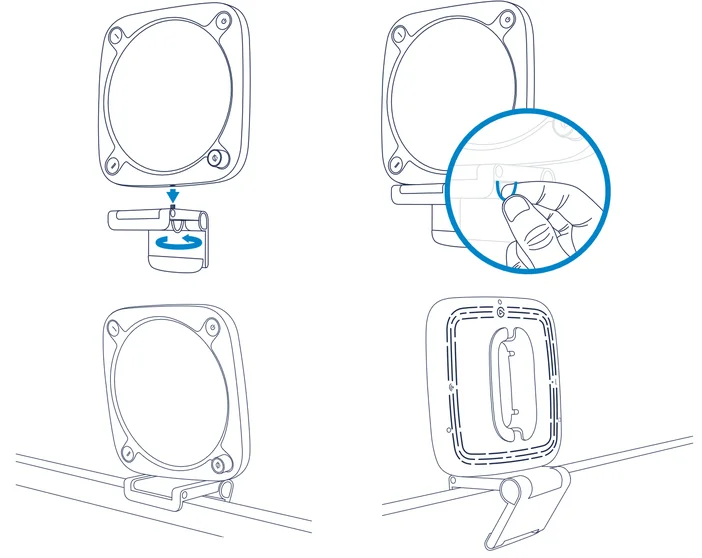
Mount Key Light Neo on your monitor. The self-adhesive base of the mount is super sticky but residue-free.
If it gets dirty, wipe with a damp cloth. Only use water, not cleaning agents.
USB Control
Step 1
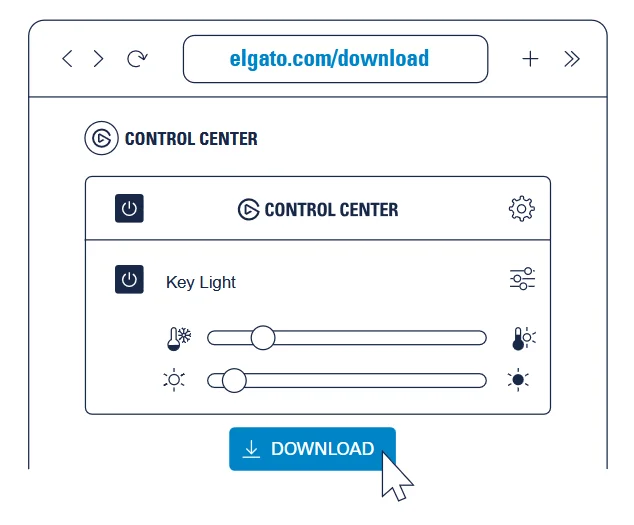
Download and install the Control Center app.
Step 2
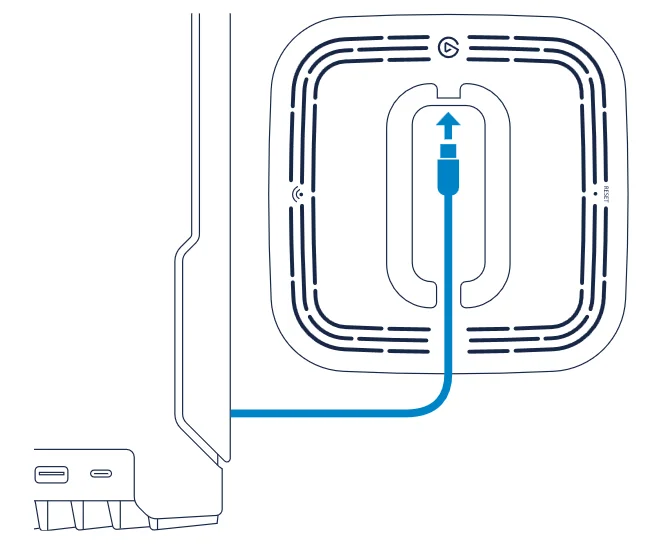
Connect Key Light Neo directly to a USB port on your PC or Mac – do not use a USB hub.
Step 3
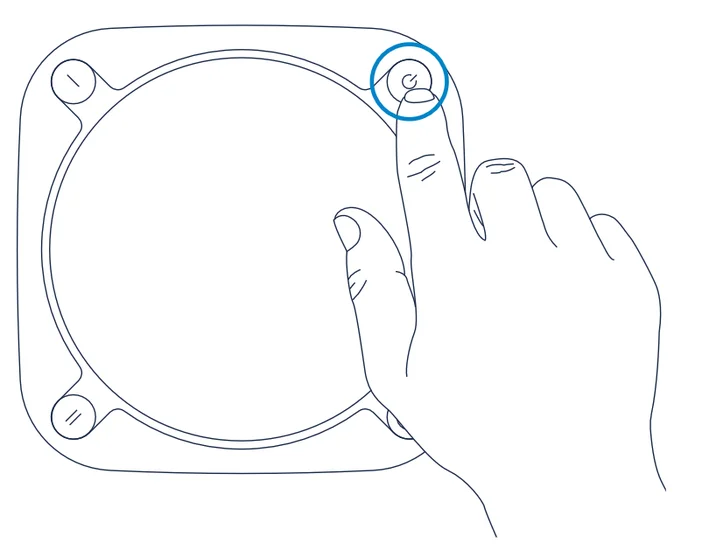
Turn on your Key Light Neo.
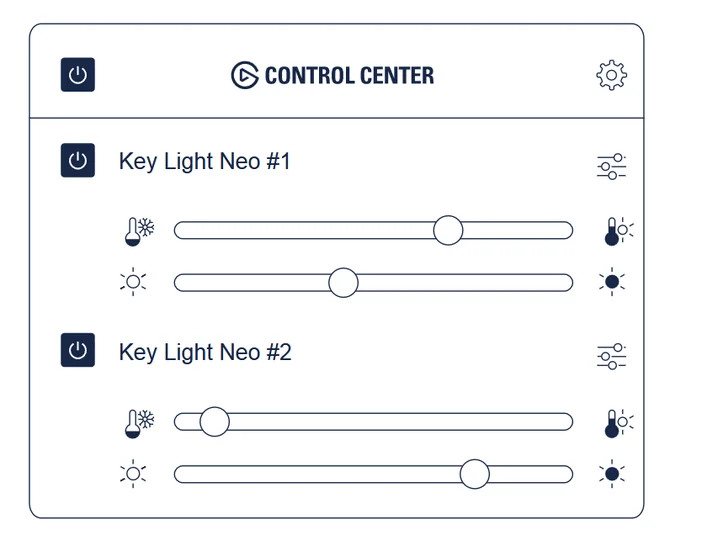
Use Control Center to turn Key Light Neo on or off, adjust brightness, and fine-tune color temperature.
Wi-Fi Control
Step 1
Download and install the Control Center app from the App Store or Google Play.
Step 2
Connect Key Light Neo to a USB power supply with a minimum power output of 3A.
Note: Do not connect to a USB port on your computer!
Step 3
Switch on your Key Light Neo
Step 4
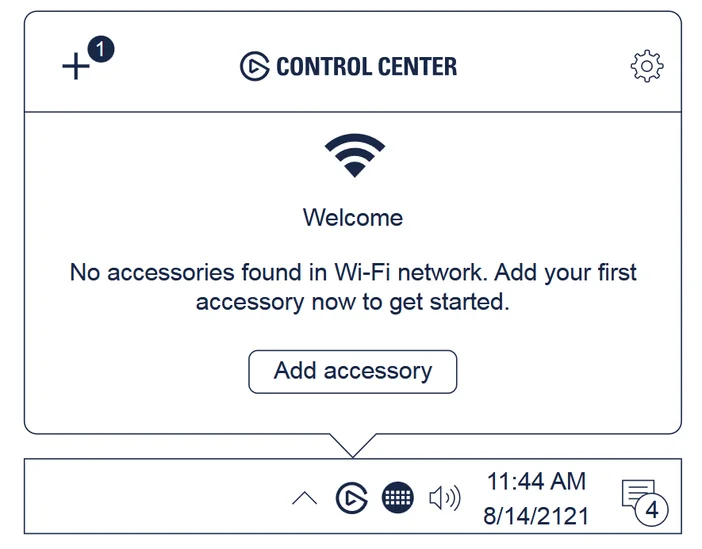
Launch the Control Center app and click the + icon to pair Key Light Neo. Use Control Center to switch Key Light Neo on or off, adjust brightness, and fine-tune color temperature.
Hardware Control
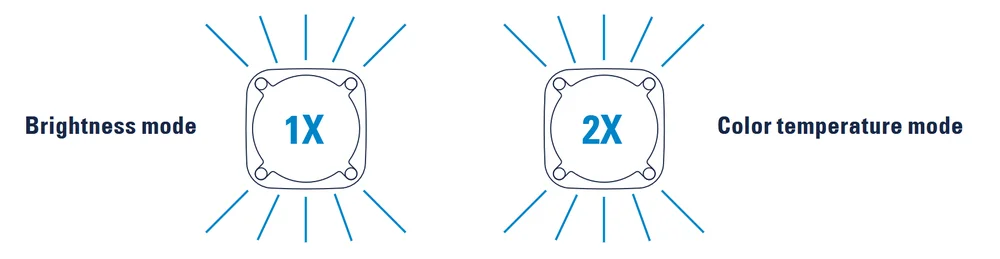
Key Light Neo is in brightness mode by default. Press the dial to enter color temperature mode (Key Light Neo will flash twice), press again to return to brightness mode (Key Light Neo will flash once). Turn the dial to adjust brightness or color temperature.
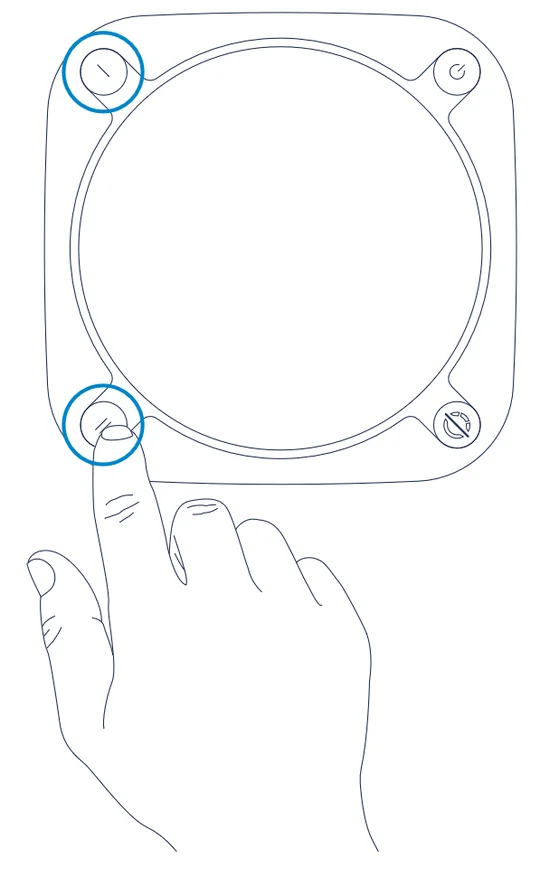
Press the Preset button to load a brightness/color temperature preset.
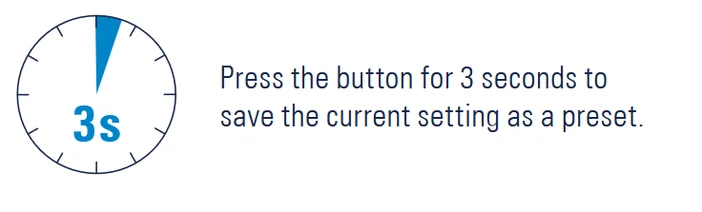
Press the button for 3 seconds to save the current setting as a preset.
Brightness Info
The maximum brightness of Key Light Neo depends on the output of your power source:
- USB-A computer port: ca. 400 lm (cable included)
- USB-C computer port: ca. 700 lm (requires cable, not included)
- External power supply: ca. 1000 lm (requires 5V min 3A power supply, not included)
Power on Key Light Neo. Push and hold the Reset button with a small tool for at least 10 seconds until the light
flashes 3 times. Then release the button. Key Light Neo will restart automatically after a few seconds.
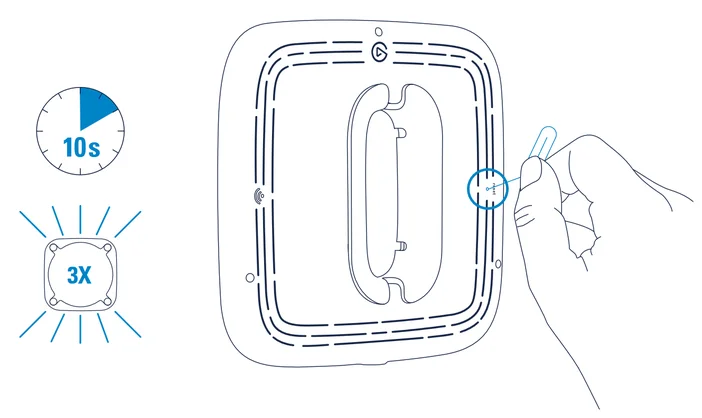
Reset will restore Key Light Neo factory settings and forget all Wi-Fi credentials.
Power on Key Light Neo. Push and hold the Reset button with a small tool for at least 10 seconds until the light flashes 3 times. Then release the button. Key Light Neo will restart automatically after a few seconds.
Warning
Key Light Neo may become hot during prolonged use. Always handle with care.
- Do not cover this product, especially the ventilation holes.
- Do not place on or near a carpet, curtains, or any other flammable materials.
- Be especially cautious when setting up near children.
- Do not attach items to Key Light Neo.
- Do not leave the product exposed to direct sunlight.
- Do not set up in areas susceptible to strong air currents. Drafts and breezes can cause movement that may result in damage to the product.
- Keep the light free from dirt and dust. If Key Light Neo becomes dirty, wipe it lightly with a soft cloth moistened with a little water and mild, neutral detergent. Benzene, thinner, and other volatile agents can cause permanent damage and should never be used for cleaning.
CE Wi-Fi 2.4 GHz Max RF e.i.r.p power < 20 dBm, Wi-Fi 5 GHz Max RF e.i.r.p. power < 23 dBm, Temperature range:
0 °C - 45 °C, BLE 2402 - 2480 MHz
This equipment complies with FCC RF, IC RSS-102 and CE radiation exposure limits set forth for an uncontrolled environment. This equipment should be installed and operated with a minimum distance of 20 centimeters between the radiator and your body. This transmitter must not be co-located or operating in conjunction with any other antenna or transmitter. For indoor use only. The light source inside this luminaire shall only be replaced by the manufacturer or authorized service agents or similar qualified personell.
Pour une utilisation en intérieur uniquement. Cet équipement est conforme aux limites d‘exposition aux rayonnements FCC RF, IC RSS-102 et CE établies pour un environnement non contrôlé. Cet équipement doit être installé etutilisé avec un minimum de 20 cm de distance entre la source de rayonnement et votre corps.
Reference control settings: The rated parameters are based on maximum light output at 4000K CCT setting from APP.
Hereby, Corsair Memory Inc. declares that this device is in compliance with the essential requirements and other
relevant provisions of Directive 2014/53/EC. The declaration of conformity for Elgato products is available at
www.elgato.com/doc
| FCC | IC | CE | |
| BLE | 2402 - 2480 MHz | 2402 - 2480 MHz | 2402 - 2480 MHz |
| 2.4 GHz | 2412 - 2462 MHz | 2412 - 2462 MHz | 2412 - 2472 MHz |
| 5 GHz (Band 1 & 2) | 5180 - 5320 MHz | 5180 - 5320 MHz | 5180 - 5320 MHz |
| 5 GHz (Band 3) | 5500 - 5700 MHz | 5500 - 5580 MHz 5660 - 5700 MHz |
5500 - 5700 MHz |
| 5 GHz (Band 4) | 5745 - 5825 MHz | 5745 - 5825 MHz | X |
Federal Communication Commission Interference Statement
This device complies with Part 15 of the FCC Rules. Operation is subject to the following two conditions: (1) This device may not cause harmful interference, and
(2) this device must accept any interference received, including interference that may cause undesired operation.
This equipment has been tested and found to comply with the limits for a Class B digital device, pursuant to Part 15 of the FCC Rules. These limits are designed
to provide reasonable protection against harmful interference in a residential installation. This equipment generates, uses and can radiate radio frequency energy and, if not installed and used in accordance with the instructions, may cause harmful interference to radio communications. However, there is no guarantee
that interference will not occur in a particular installation. If this equipment does cause harmful interference to radio or television reception, which can be
determined by turning the equipment off and on, the user is encouraged to try to correct the interference by one of the following measures:
- Reorient or relocate the receiving antenna.
- Increase the separation between the equipment and receiver.
- Connect the equipment into an outlet on a circuit different from that to which the receiver is connected.
- Consult the dealer or an experienced radio/TV technician for help.
FCC Caution: Any changes or modifications not expressly approved by the party responsible for compliance could void the user‘s authority to operate this equip-
ment. This equipment complies with FCC radiation exposure limits set forth for an uncontrolled environment. This equipment should be installed and operated
with a minimum distance of 20 cm between the radiator and a human body.
For questions about Elgato product compliance with FCC regulations, please contact: Compliance Officer, Corsair Memory Inc., 115 North McCarthy Blvd,
Milpitas, CA 95035, USA
This device complies with Industry Canada license-exempt RSS standard(s).
Operation is subject to the following two conditions: (1) this device may not cause interference, and (2) this device must accept any interference, including
interference that may cause undesired operation of the device.
Le present appareil est conforme aux CNR d‘Industrie Canada applicables aux appareils radio exempts de licence.
L‘exploitation est autorisée aux deux conditions suivantes : (1) l‘appareil ne doit pas produire de brouillage, et (2) l‘utilisateur de l‘appareil doit accepter tout
brouillage radioelectrique subi, meme si le brouillage est susceptible d‘en compromettre le fonctionnement.
The declaration of conformity for Elgato products is available at www.elgato.com/doc
Rating: 5 V, 3 A
NCC警語
取得審驗證明之低功率射頻器材,非經核准,公司、商號或使用者均不得擅自變更頻率、加大功率或變更原設計之特性及功能。低功率射頻器材之使
用不得影響飛航安全及干擾合法通信;經發現有干擾現象時,應立即停用,並改善至無干擾時方得繼續使用。前述合法通信,指依電信管理法規定作
業之無線電通信。低功率射頻器材須忍受合法通信或工業、科學及醫療用電波輻射性電機設備之干擾。
應避免影響附近雷達系統之操作。
高增益指向性天線只得應用於固定式點對點系統。
R-R-CSI-20LAJ9901
Applicant Name (상호명): Corsair Memory, Inc.
Product Name (제품명칭): Key Light Neo
Model No.(모델명): 20LAJ9901
Manufactured Year & Month (제조연월): Please refer to gift box sticker
Manufacturer & Origin (제조자 및 제조국가): Corsair Memory, Inc./Please refer to gift box sticker
A/S : (주)컴스빌, 1522-1460
Elgato, a division of:
Corsair Memory Inc., 115 North McCarthy Blvd, Milpitas, CA 95035, USA
Corsair Components Limited, 1020 Eskdale Road, Winnersh Triangle, Wokingham, RG41 5TS, UK
Corsair Memory BV, Wormerweg 8, 1311 XB, Almere, Netherlands
Copyright 2023 Corsair Memory Inc. All rights reserved. Elgato and the Elgato logo are trademarks of Corsair Memory Inc.,
registered in the U.S. and other countries. All other trademarks belong to their respective owner.
Part: 51LAY9902