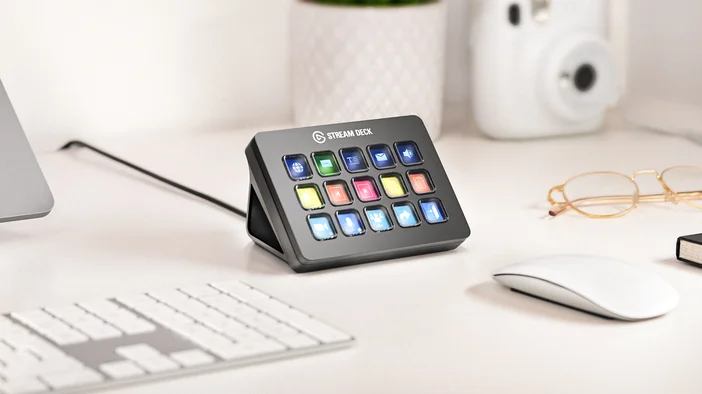
The name says "Stream," but Stream Deck has become something much bigger than that. It is a customizable device that puts your most-used actions on visible, programmable LCD keys. Each key shows what it does, updates in real time, and can be changed to match any app, game, or workflow.
Whether you are gaming, sitting in back-to-back meetings, editing photos, controlling your room lighting, or just want faster access to everyday tasks, Stream Deck gives you one-tap control over things you would normally dig through menus or memorize keyboard shortcuts to reach.
How Stream Deck works
Each key on Stream Deck is a small LCD screen. You assign actions to keys using the free Stream Deck app on Windows or macOS. Drag an action onto a key, and it is ready to go.
Because every key displays what it does, you are never guessing which shortcut does what. You just look down, find the action, and tap it. Keys also update with live information, like whether your mic is muted, your current CPU temperature, or the weather outside. That visual feedback keeps you informed without switching windows or opening extra apps.
Why not just use keyboard shortcuts?
Keyboard shortcuts can technically do a lot of what Stream Deck does. But hotkeys have a focus problem. If you are in one app and try to trigger a shortcut meant for another, it might not work because the wrong window has focus. You end up switching between apps just to execute a command, which is not reliable in the middle of a game, a meeting, or a focused editing session.
Stream Deck avoids this because its software integrates directly with applications. When you tap a key, it communicates with the app in the background. No focus switching, no alt-tabbing, no guessing whether the command went through.
Actions and plugins
Stream Deck comes with built-in actions that cover everyday tasks like launching apps, opening websites, controlling media playback, setting hotkeys, and adjusting system volume. These work right out of the box and handle a lot on their own.
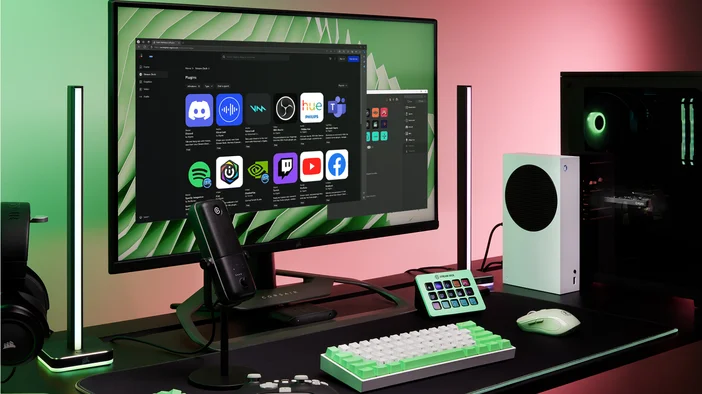
When you want Stream Deck to work with a specific app or service, that is where plugins come in. A plugin is a small add-on that you install inside Stream Deck app, and it unlocks new actions tied to that tool. Install the Spotify plugin, and you get actions for play, pause, skip, and volume. Install the Philips Hue plugin, and you can control your smart lights from a key. Most plugins are free, and adding one takes a few clicks.
Between built-in actions and the library of available plugins, Stream Deck connects to a wide range of tools. Here is what that looks like in practice.
What can you do with it
Gaming
Games with layered control systems pile on keybinds over time. Titles like Star Citizen, Microsoft Flight Simulator, Helldivers 2, and World of Warcraft ask you to remember dozens of secondary actions that are easy to forget between sessions. Stream Deck gives those actions a visible home. The action is labeled, grouped, and ready to tap. On GALLEON 100 SD, Stream Deck keys are built directly into the keyboard for even quicker access while you play.
Work and meetings
Muting your mic, toggling your camera, sharing your screen, leaving a call. These actions are buried in different corners of different apps. Stream Deck puts them on physical keys you can tap without looking away. Plugins for Zoom, Microsoft Teams, Slack, and PowerPoint bring controls like jumping into a DM, pausing notifications, navigating slides, or updating your status directly onto your keys.
Creative work
The official Adobe Photoshop plugin adds native control for layer navigation, tool switching, undo and redo, and color adjustments using dials. Stream Deck also works with Lightroom, Illustrator, Premiere Pro, and DaVinci Resolve. For music production, you can map DAW transport controls, adjust mixer levels, and trigger samples.
Streaming and recording
Switch scenes in OBS Studio or Streamlabs Desktop, trigger alerts, toggle media sources, and start or stop recordings from physical keys. You can trigger sound effects, post messages to chat, or combine everything into a single action that handles your entire broadcast setup with one tap. Keys show live status like whether you are broadcasting and your current viewer count.
Your desk, your home, your system
This is where Stream Deck tends to surprise people. Plugins for Philips Hue and Nanoleaf let you control room lighting from a key, no phone needed. The Weather plugin shows live conditions and forecasts right on your display. System Vitals show real-time system stats like processor load and temperature. You can also launch apps, switch audio outputs, set countdown timers, or build a routine that opens everything you need with a single tap.
Live production and broadcast
Stream Deck scales to professional environments. Stream Deck + XL offers 36 keys, 6 dials, and a touch strip for managing cameras, graphics, lighting, and audio cues. Stream Deck also works with Bitfocus Companion and Buttons, opening up control for hundreds of broadcast and production systems.
Find more on Elgato Marketplace
Elgato Marketplace is the hub for everything that extends your Stream Deck setup. Plugins, pre-made profiles, icon packs, and soundboards are all available in one place, accessible directly inside Stream Deck app or from a web browser.
New plugins and profiles are added regularly by Elgato and the community. If you are curious about what Stream Deck can do with the tools you already use, Marketplace is the place to start.
Going deeper
Once you have a few actions set up, Stream Deck has features that help you organize and get more out of your keys as your setup grows.
Pages and folders
Give you more room without clutter. Pages let you add extra layouts you can swipe between. Folders group related actions behind a single key, so you can tap into them when needed and back out when you are done.
To learn more organizing your Stream Deck, check out our guide here.
Smart Profiles
Switch your layout automatically when you change apps. Open Photoshop, and your editing shortcuts appear. Switch to a game, and your gaming controls take over. No manual switching.
To learn more about setting up Smart Profiles, check out our guide here.
Multi Actions
Let you assign a sequence of commands to a single key. One tap can launch your work apps, position windows across monitors, adjust your lighting, and set your audio output all at once. Multi Actions work with any combination of built-in actions and plugins, which makes them one of the most powerful features in Stream Deck once you start building routines.
Dials
Are available on Stream Deck +, Stream Deck + XL, and GALLEON 100 SD. They add rotary control for things like volume, display brightness, or scrubbing through a timeline, adjustments that feel more natural with a turn than a tap.
Which Stream Deck is right for you
Stream Deck comes in several sizes and formats. Stream Deck Mini and Stream Deck Neo cover the essentials for smaller setups. Stream Deck MK.2 is the all-rounder for most people. Stream Deck +adds rotary controls for audio and creative work. Stream Deck XL (32 keys) and Stream Deck + XL give you room to keep everything visible at once. Stream Deck Studio is built for professional and enterprise environments. Stream Deck Pedal adds hands-free control. GALLEON 100 SD builds Stream Deck directly into a full-size mechanical keyboard. And Stream Deck Mobile turns your phone or tablet into a portable Stream Deck.
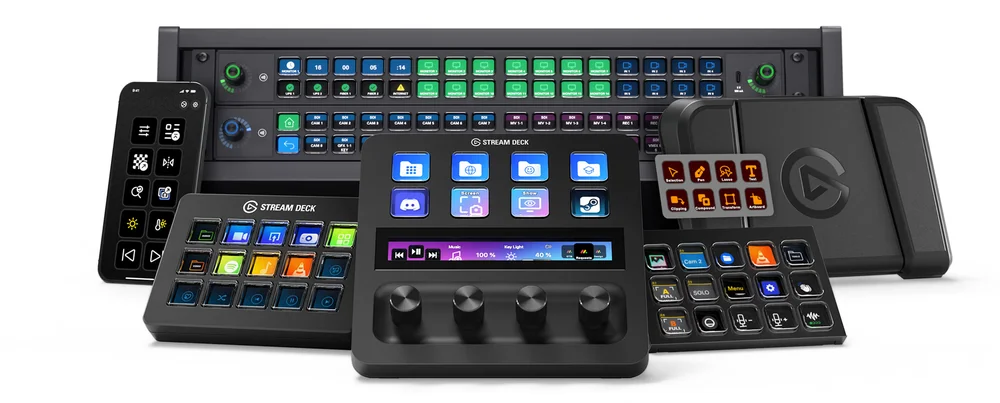
For a full breakdown, check out the Stream Deck device comparison guide.
PRODUKTI RAKSTĀ