Probablemente hayas notado la diferencia entre alguien que suena como si estuviera hablando por el micrófono de un ordenador portátil y alguien que suena como si estuviera en un podcast. Wave FX está diseñado para cerrar esa brecha. Es el motor de procesamiento de audio integrado en todos los nuevos dispositivos Wave, desarrollado en colaboración con LEWITT, y ofrece un sonido pulido y consistente desde el momento en que lo conectas.
Wave FX es una pieza de un sistema más amplio. Wave Link 3.0 se encarga del enrutamiento y la mezcla a nivel de software, y Wave FX procesa el audio directamente en el hardware. En combinación con Stream Deck, obtienes un control práctico sobre todo tu flujo de trabajo de audio.
¿Qué hace realmente Wave FX?
Wave FX gestiona tres cosas en una ruta de señal continua:
- Clipguard 2.0 evita la distorsión antes de que se produzca, por lo que nunca tendrás que preocuparte por el clipping cuando subas el volumen.
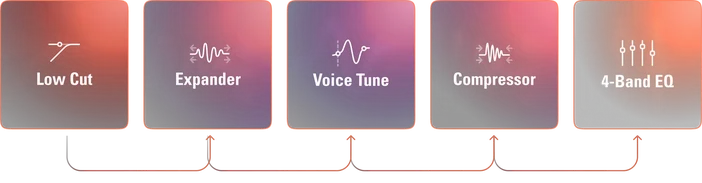
- Los efectos DSP moldean tu voz directamente en el dispositivo. El filtro de corte de graves, el expansor, el afinador de voz, el compresor y el ecualizador se ejecutan en un chip dedicado con monitorización sin latencia.
- Las inserciones VST te permiten añadir efectos de audio como reverberación o efectos de voz, y todas las aplicaciones de tu sistema reciben el resultado automáticamente.
Como las tres etapas están conectadas en una sola cadena, tu voz fluye a través de cada una de ellas en orden. El resultado es un audio limpio y procesado que funciona igual en todas las aplicaciones, ya sea OBS, Discord, Zoom o cualquier otra.
Clipguard 2.0: No vuelvas a preocuparte por los clips nunca más.
Todos hemos vivido ese momento. Te ríes demasiado, reaccionas a un susto repentino y el audio se distorsiona. Eso es el clipping, y una vez que ocurre, no hay forma de revertirlo.
La mayoría de la gente soluciona esto bajando la ganancia. Así se mantiene la seguridad, pero la voz suena más baja de lo que debería.
Clipguard 2.0 adopta un enfoque diferente. Utiliza tres convertidores analógico-digitales apilados que funcionan en diferentes etapas de ganancia y los fusiona en una única señal flotante de 32 bits. Dado que los convertidores funcionan conjuntamente en un amplio rango dinámico, el sistema captura un audio limpio incluso durante picos de volumen repentinos. No hay ningún punto en el que tu voz pueda sobrecargar la entrada. Solo tienes que ajustar la ganancia donde tu voz suene mejor utilizando el asistente de ganancia automática, y Clipguard se encarga del resto.
Lo sometimos a algunas situaciones extremas para ver hasta dónde podía llegar antes de romperse. No se rompió.
Efectos DSP: mejor sonido sin conjeturas
El audio del micrófono sin tratar capta todo. El ruido de la habitación, el ruido del ventilador, los clics del teclado y los altibajos naturales de tu voz. Para solucionar esto, normalmente hay que configurar los efectos en la aplicación de streaming o en un plugin host y esperar que todo esté bien configurado.
Wave FX ejecuta los efectos directamente en un chip integrado en nuestros dispositivos Wave. Esto tiene dos ventajas: puedes escuchar tu voz procesada en tiempo real a través de los auriculares sin ningún retraso y el sonido se mantiene constante en todo momento.
Esto es lo que hay disponible:
- El filtro de corte bajo elimina los ruidos de baja frecuencia procedentes, por ejemplo, de las vibraciones del escritorio y del aire acondicionado.
- Expander reduce silenciosamente el ruido de fondo entre tus frases sin cortar el comienzo de tus palabras.
- Voice Tune añade calidez y plenitud a tu voz con un solo control deslizante. Para obtener más información, consulta nuestra guía de Voice Tune.
- El compresor equilibra las diferencias de volumen para que las palabras más bajas se escuchen con claridad y los momentos más fuertes se mantengan controlados.
- El ecualizador te permite ajustar tu voz en cuatro bandas de frecuencia para obtener mayor claridad o calidez.
Wave XLR Pro añade dos efectos DSP exclusivos:
- Ducking, que reduce automáticamente el audio de fondo cuando hablas.
- Mix Maximizer, que aumenta el volumen de salida sin distorsión.
Todos los efectos DSP se gestionan a través de Wave Link, y puedes utilizar Auto Gain Wizard para configurar tus niveles antes de seleccionar tus efectos.
Inserciones VST: tus efectos de audio, en todas partes
Si utilizas plugins VST o Audio Unit para reverberación, eliminación de ruido o efectos de voz, ya conoces la configuración habitual: pasar por un host de plugins, enviar la salida a un micrófono virtual y configurar cada aplicación para que lo utilice. Funciona, pero es una cosa más que gestionar.
Los insertos Wave FX simplifican este proceso. El procesador Wave FX se conecta directamente a Wave Link a través de una interfaz dedicada de alta velocidad. El audio se envía a Wave Link para su procesamiento mediante plugins y, a continuación, se vuelve a insertar en el flujo de señal del hardware antes de llegar a las aplicaciones. Cualquier aplicación que utilice el dispositivo Wave como entrada obtiene el resultado automáticamente. Sin micrófonos virtuales ni enrutamientos adicionales.
Elgato Marketplace cuenta con una biblioteca cada vez más amplia de efectos creados para Wave Link, y también puedes cargar tus propios complementos de terceros.
Para obtener una descripción detallada del funcionamiento de las inserciones VST, consulta nuestra explicación.
Nota: Los efectos VST pueden introducir una latencia adicional dependiendo de tu configuración.
Problemas comunes que resuelve Wave FX
Distorsión de audio por volumen alto: Clipguard 2.0 captura tu voz en múltiples etapas de ganancia utilizando convertidores ADC apilados y procesamiento flotante de 32 bits. Incluso los gritos repentinos se escuchan con claridad.
Ruido de fondo entre frases: el expansor y el filtro de corte bajo funcionan conjuntamente para reducir el ruido del ventilador, el ruido de la sala y los sonidos del teclado sin afectar a tu voz.
Sonido inconsistente entre aplicaciones: los efectos se aplican en el hardware antes de que el audio llegue a cualquier aplicación, por lo que todas las aplicaciones reciben la misma señal procesada.
Enrutamiento VST complejo: las inserciones VST gestionan el procesamiento de los plugins dentro de la ruta de la señal. No se necesitan cables de audio virtuales ni aplicaciones en segundo plano.
Retraso de monitorización con efectos: los efectos DSP se ejecutan en el dispositivo, por lo que puedes escucharte procesado en tiempo real sin latencia.
¿Qué dispositivos incluyen Wave FX?
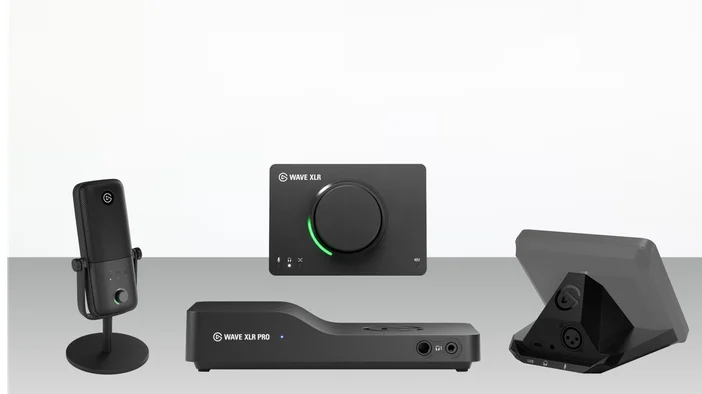
Wave:3 MK.2 es un micrófono condensador USB con una cápsula cardioide ajustada con LEWITT, DSP integrado, Clipguard 2.0 y compatibilidad con VST Insert. Auto Gain Wizard simplifica la configuración, y dos modos de monitorización te permiten escuchar tu audio procesado por DSP o totalmente integrado con efectos VST aplicados. Es la forma más sencilla de empezar a utilizar Wave FX.
Wave XLR MK.2 es una interfaz de micrófono que integra cualquier micrófono XLR en el ecosistema Wave con procesamiento Wave FX. Ofrece 80 dB de ganancia limpia, alimentación fantasma de 48 V y 135 dB de rango dinámico, y es compatible con todo tipo de micrófonos, desde condensadores sensibles hasta micrófonos dinámicos para radiodifusión que requieren mucha ganancia.
Wave XLR Pro es una matriz de audio por hardware con dos entradas XLR totalmente independientes, cinco mezclas basadas en hardware y el paquete completo Wave FX, que incluye Ducking y Mix Maximizer. Admite auriculares de hasta 600 ohmios, incluye el modo autónomo para funcionar sin ordenador y saldrá a la venta en el segundo trimestre de 2026.
XLR Dock MK.2 es una interfaz de micrófono XLR diseñada exclusivamente para Stream Deck +, que combina Wave FX con las teclas y diales personalizables de Stream Deck. Incluye 80 dB de ganancia limpia, alimentación fantasma de 48 V y un amplificador de auriculares mejorado con dos modos de mezcla. XLR Dock requiere Stream Deck + y no funciona como dispositivo independiente.
Todos los dispositivos utilizan el mismo procesador Wave FX, por lo que la experiencia y la calidad del sonido son uniformes en todo el ecosistema Wave.
Parte de un flujo de trabajo más amplio
Wave FX procesa el audio a nivel de hardware, pero está diseñado para funcionar como parte de un sistema conectado. Wave Link 3.0 proporciona enrutamiento, mezcla y gestión de efectos a nivel de software. En combinación con Stream Deck, se obtiene un control práctico sobre los niveles, el silenciamiento, los efectos y el cambio de mezclas sin necesidad de abrir ningún software.
Tanto si empiezas con un solo micrófono como si estás montando una configuración más compleja, Wave FX te ofrece un audio procesado y uniforme en todas las aplicaciones desde el momento en que lo conectas.